Showing posts with label Apple. Show all posts

Monday, 7 January 2013

The Digital Divide: Challenge for 2013!

Web Link!

Accessing the digital village!


On the face of it the UK is a developed country.  We have generally enough food, we have freedom of expression, we are generally well housed , we have free state provided healthcare and basic education.  These are some of the hallmarks we traditionally associate with a developed or first world country!

The  criteria to assess how developed a country may be is rapidly changing.  With the advent of the digital economy and the global village, we are now seeing the world becoming increasingly connected.  Barriers to information exchange and trade provided by traditional political boundaries of countries and local governments are not in general of great influence.  Technology giants such as Apple, Google, Huawei and Microsoft have been the generally drivers of the new hallmark of digital connectivity.   

Applying the hallmark of digital connectivity to measuring the UK's fitness for purpose in the global village is a relative measure.  We are doing better than most but there is a still parts of the community that are experiencing a digital desert.  The UK has approximately 750,000 school age children without access to a computer linked to the internet at home (http://www.bbc.co.uk/news/education-20899109).  With the average size of household taken as 4 (for instance) that is 3 million people who are missing out on the digital revolution.

The estimate of 3 million does not include the elderly and other adults without access to the internet.  This is a problem as increasingly we see services like Jobcentre Plus, Taxes, Benefits and interactions with service providers such as councils and banks go online.  Seeing a "local face" behind a counter is increasingly rare.

Addressing this problem has been the "job" (more like Herculean task) of Martha Lane Fox (http://www.bbc.co.uk/news/10575266).  There is now a digital advisory board ( http://digital.cabinetoffice.gov.uk/2012/04/25/introducing-the-digital-advisory-board/ )  to coordinate the plan.  This has taken nearly two years to set up judging by the time stamps on the news stories and announcements.  Digital in the title  therefore does not necessarily mean it will be rapid. 

How to get the 3/4 million children online?  Problems identified include access to computers and access to  an internet connection at home.  The premise of the survey is a need for a computer (probably desktop) for access sites for homework and learning.  Up to Christmas of 2012 saw a massive leap in the sales of Tablets in the UK with 2012 been described  as the year of the Tablet (http://news.bbc.co.uk/today/hi/today/newsid_9781000/9781351.stm).  For the majority of the use needed for after school tasks a tablet is all that is required for most pre-Key Stage 3 tasks.  An Android seven inch tablet operating on the 4.0 release can now be found on sale for £60 pounds, less than the cost of a pay as you go mobile phone.  The internet connection is the tricky problem.  How to provide cheap cost effective connection to reduce the digital desert! More thoughts on this will appear in a related blog at (http://ukonlinelearningcommunities.blogspot.co.uk/).

2013 is going to be an exciting year.  The year we become connected.  One experiment of mine in digital connectivity is the Haverhill Online Learning Community.  Visit and join the groups or community and help us make a better digital experience!      

Thursday, 25 October 2012

The Right Slate!

The Roman Wax Tablet
(from Vindolanda)

Technology in the classroom!


On the face of it the use of a tablet is today a "new" concept.  The advent of cheap paper has led to the prevalence of a one time use recording medium.  The Roman Wax Tablet and the Victorian slate with hard or soft (chalk) stylus. The Victorian slate is still within living memory, especially with some of the 80 year olds who frequent my local pub!

So on the face of it paper in the classroom for recording thoughts has a relatively short history of general use.  The re-emergence of the age of the tablet age in the early 21st Century is  another milestone in mass education.  


The Victorian Slate
Looking at the Victorian slate the shape would be instantly recognisable to any child over the age of 4 (probably younger).  It's purpose apparent as long as the stylus was present. Cheap and abundant materials, often recyclable as  "everybody" had a slate roof in the Victorian Britain, that can be made into a essential classroom tool.

Here is the sticking point.  Cheap materials and universal access to the tool.  Manufacturers of learning tools, in this context tablets, have quite rightly used patent law to recoup their investment. The ongoing litigation between two major companies as to who invented the "wheel" is  possibly going to delay some of the take up of both products.  The entry cost and the propensity for updates or new operating systems is another headache.    


Google's latest offering, the Nexus 7 is a tablet I really like.  Experience of designing and procuring a whole school IT system, makes me wish there had been a solution such as this ten years ago.  The  cost per unit of £159 is reasonable could be a lot cheaper.  Android based tablets running Ice Cream Sandwich and Jelly Bean are available and perform the function but may not have the big brand coolness of a Google or for that matter Apple (there mentioned it) product.   

I have to admit I have only used a Nexus 7 so far in a PC World store.  I had until 4 months ago a Scroll tablet running Android 2.0x, and a USB keyboard/case.  This was all well and good until I signed up for the Telegraph Newspaper for Android.  Having not read the small print that the Telegraph content required Ice Cream Sandwich (Android 4.0) my experience was a bit curtailed.  The reason: the Scroll tablet was not powerful enough to be updated to Android 4.0.  The tablet had been bought about a year or 15 months ago, so really early in the evolution and visibility of Android tablets, and already was not able to run the latest Android.  The ARM race (pun intended) was  only just starting.  

Use of Google type hangout technology and other Google Apps for Education even removes the need for expensive projectors and Whiteboard Technologies.  The ownership of a single tablet through a pupil's learning journey is a bit like the Scientific Calculators we used to buy when we were 12 (pre-PC in the classroom).  I was using mine right through 1st year University Physics and beyond.  Increasingly pupils are being encouraged to carry internet enabled in schools as an aid to learning.  The distraction factor of these technologies and the monitoring of on task behaviour may become a problem initially especially with the  "Facebook Addiction" problems a lot of educators are concerned about.  Bluetooth may be one technology that could make a comeback within rooms.  It may also address some of the "open network" issues that fall in the remit of Safeguarding.   

Longevity of technology is a  key factor as much the physical layout of the learning environment.  Many traditional classrooms do not readily lend themselves to being digitised.  The schools building programme in the UK is a contentious issue with standardised  layouts being proposed that appear to rectangular boxes a bit like a shipping container.  These is even a designated cost per square foot that cannot be exceeded unles schools pay for it themselves (http://www.bbc.co.uk/news/education-19787570).   


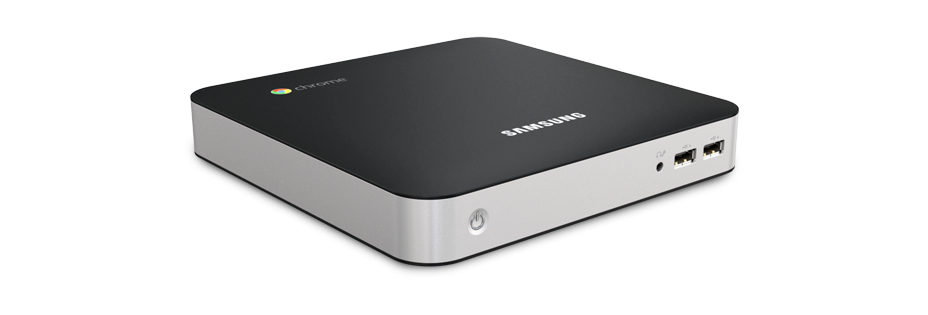
Chromebox
 Hopefully, the architecture of the Android or Chrome OS has reached a stage of maturity that it will not become any larger or require a better chip set to just to run.  The claim of the manufactures is that the Chromebox is future proof.  This is something that Windows has not been able to make that claim.  I have seen everything from Windows 3.0x onwards and will probably see Windows 9, 10 and ....     The Chrome box appears to address the increasingly less frequent need for keyboard and hardwired networking at cheap unit price (£270) with provision for HDMI which seems to be becoming the standard.  Traditional one connection type monitors appear to be a passing trend.  HDMI TVs are becoming very cheap and are built to last and are pretty robust.  Printers are not necessarily a future requirement in the digital classrooms.  

So stripping out the hardware requirement of providing for access to IT resources leads to consideration of the network environment.  Windows networks require administrators, technicians and specialised software to produce a safe working environment.  The solution offered by Google is through the Chrome set up http://support.google.com/chromeos/a/bin/answer.py?hl=en&answer=1289314.  This looks like a great solution especially for small schools which do not have access to technical expertise all the time.

A very Googlecentric  blog post but I personal think the Android/Chrome platform has a lot to offer.  The impact of technology should be there as a tool to be used appropriately and not because we have invested so much money in a lot of shiny boxes and need to use them!


Saturday, 13 October 2012

Who is teaching IT?

National Curriculum and ICT.

The debate is it  ICT or computer science we are to teach in English Schools.  I say English  since we have differing Curricula in the UK between the home nations.  For those not aware of the difference Information Communication Technology is the use of propriety software to improve the user interface, while computer science is loosely taken to mean how to code and understand how the black box works.

The past 15 years or so of the National Curriculum has sought to make people Microsoft Office literate.  Great if we were in the UK    to be the great service economy as promised 25 years ago.  Over the years the teaching of ICT has been dominated by Microsoft Office programmes.  Even though there is no stipulation anywhere in guidance notes or the curriculum that stipulates Microsoft products.  It has just happened that way!

In my experience, even I have to hold my hands up to this, most teachers of ICT do not have anything to do with the maintenance of the servers or the day to day admin tasks.  As a head of ICT I operated with a technician off-site (who was originally employed by me in the school), anything to do with server they sorted out.  Most Admin tasks I was able to carry out but also being a Head of Science I did not have the time to do the Microsoft Server work.  It is a very labour intensive system environment prone to falling over.

With new Academies setting up and the emergence of Linnux and open licence software, Google Chrome and Android Apps there is the chance to move away from Microsoft and Apple.  The cost of the licensing and equipment (more so in Apples case) is a major part of the cost of putting in an ICT suite.  Having been responsible for the installation of  a suite of 30 desktops, furniture, with Server and optical networking plus WiFi in 2005 across a site having 35+rooms for just over £30,000.  The frustrating part was having to pay for the educational licenses.  This is especially gauling since we are training users of Microsoft technologies  who will more than likely be captive users for the rest of their lives. Old habits die hard!

The idea of coding with the community of ICT teachers is something that is often considered too hard.  We took part in the Schools Organisational Review as one of the first schools in Suffolk and Federated with an Upper School that eventually subsumed the school.  The help that was sent down to bring ICT "up to speed" was very dismissive of the suggestion that we should start to think about adding XML  for some of  the brighter pupils, since "we don't teach hard coding".  The wind of change is now blowing!

Looking at the coding issue an article that seeks to address the issue (http://www.telegraph.co.uk/education/9600921/Computer-programming-who-is-teaching-our-children-to-code.html) of who is actually doing the teaching.  In the vacuum between out with the old in with the new of curriculum change some indutrial interests are getting involved.  One approach is Apps for Good where Dell apparently send people into secondary schools to help with the coding.  Mozilla is  there with Webmaster.  Scratch which I have mentioned in previous blogs is also mentioned.

A colection of websites for coding from the above article are below:
Scratch
A visual programming language for children age 6 and up, developed at MIT. Allows users to create and share interactive games.
Hackasaurus
In-browser 'x-ray goggles' which allow you to see the HTML elements that make up every webpage - and lets you edit them yourself.
Thimble
Code 'spellchecker' and preview window which makes web editing simple. Create your own functional page in minutes and host it online.
Hackety Hack
Learn the Ruby programming language from scratch with this free downloadable software.
Code Academy
Learn the basics of Javascript, Python and Ruby through these fun interactive online course. Suitable for teenagers and upwards.
Code School
More advanced tutorials in Ruby, Javascript and CSS design which allow you to share your progress with the coding community.
The idea of coding is a apparently a worthy aim to aspire to.  If the coding is hardware independent it has longevity.  In the last 16 years we have gone through many changes in the perception of the pint delivery of digital services. The ability to manipulate the hardware with coding skills is admirable but there needs to be a reason to do so.  Identification of computational skills as more important than actual programming skills is proposed in the blog http://drtomcrick.wordpress.com/?blogsub=confirming#blog_subscription-4.  Essentially this is problem solving.  To access this requires probably stronger mathematical skills than some might have. This is possibly a push for the IT curriculum to be a part of the Maths curriculum and not a stand-alone subject!

Monday, 8 October 2012

Raspberry's and Pythons!

Raspberry Pi, an education platform!

Raspberry Pi, low cost credit card sized computer , has initially been put together by the charitable trust that designed it as an educators platform.  The primary intention to educate the young (under 18 year olds) in the mysteries of computer architecture and programming.  

A step back to the days of self build computers in the late seventies and early eighties.  I do remember buying Personal Computer World and looking at the Commodore PETs and wincing at the price beyond my pocket money.  Migrating to the more techie magazines where bare boards could be bought and made up the costs again seemed to escalate.  The Sinclair ZX80  arrived, still too expensive (half a weeks wages for the average for the worker) then the ZX81 (I finally managed to own one of these).   Then came Windows! 

Each time a new "consumer" computer arrived the machine became more enclosed and a black box culture started to emerge of plug and play.  In amongst this the educational use and then the UK National Curriculum for IT or ICT arrived.  This sought to educate people in the end use of technology as opposed to understanding the technology. The lack of understanding of what is within the black box was obscured by the use of WYSWYG applications that bridged the gap between hardware understanding and programming skills.   Basic engineering and STEM (the new buzz word) skills were no longer there since the cost of the item was so expensive tinkering with the engineering was naturally shied away from.  The Raspberry Pi again gives this feel of a new start to computing.  

Raspberry Pi is a Linnux based system with the operating system stored on an SD card which in effect is a solid state hard drive.  This comes in various different versions and images downloadable from the Raspberry Pi foundation.  The interesting feature for me at the moment is that the latest images are supporting Python.  Python is one of the fundamentals to Google Course builder.  As system is Linnux based, a precursor of Android and uses an ARM processor it should be possible to get the Raspberry Pi to run the App engine.  

Manufacturing of the Raspberry Pi has only really just started to go into volume.  At a price of £35 for the basic unit a more economical way of ensuring cheap access to the digital classroom than an Apple or a Samsung solution.


Thursday, 4 October 2012

Google Course Builder: Pythons and Apples

Android vs Apple

A school decides that that pupils can keep their mobile devices on.  This may go against most school policies but will become more common.  This is the choice of a Federation of schools in Cambridge.  They have gone down the route of having work available on the website.  IPods are the device of choice.  IPads would be even better.  Having a niece attending the Federation the cost implication is something that this of concern.

The cost of using the mobile device for data transfer is prohibitive if it with 3G connection.  The coverage in East Anglia is quite sparse outside the A12 and A14 corridor.  So WiFi hot-spots would be the connection of choice.  The so called free WiFi operated by most internet providers are not actually free as you have to be a subscriber to that IP.  "Public" WiFi within a school usually requires a key or Login, a bit like a Fon account.  In Cambridge there is a cheaper alternative the Cambridge Matrix outside of school, allegedly there are many places in Cambridge where access is actually free.

Assuming the connection you have is cost effective what should parents be consulted on if they are being asked to buy the device that enables the education.  The choice is obviously now between two platforms Apple based or Android based.  The speed which Apple appears to be turning out new products is a bit like a post cold war arms race.  Can parents afford to have the most recent Apple incarnation?  Question need also to be asked on the reliability of the technology and ethos of releases  as Apple struggle with complaints of  handset   quality and access to Apps. This also against the background of the reliability of Apple suppliers as their Chinese suppliers experience industrial unrest!

Android is available across a number of different suppliers.  The solutions are often cheaper than Apple's and may with Android based operating systems have greater longevity.  The use of  an Android fork version by Amazon for it's Kindle Fire tablets, Google's own Nexus.  The Nook (Barnes and Noble's) offering also provide some new insights to 21st Century digital classrooms.  The big question is what is driving this the needs of the students or needs of the needs of the companies' to establish their product as the must have educational tool to exclusion of other platforms.  

Sitting in the background is the Software giant Microsoft.  I can consider myself one of the first generation of IT literate teachers to be trained.  Owing to the nature of Geography and the School Centrered Initial Teacher Training Course in 1996 to 1997 we were provided with Laptops.  In conjunction with BT had the possibility of using video conferencing to link up schools and training sites in the hinterland of the north east Essex coast.  The Microsoft Academy status of some schools has in my limited experience of being attached to a said Microsoft Academy had not been implemented across whole school.  Looking at the website again it appears to be again a system designed for large organisations and expensive laptop and PC solutions with  limited portability between institutions unless you are a licensed Microsoft Academy or educator.

So the choice.  On strictly cost basis both for educator and student the route of Android would seem to be most likely to promote longevity of resource relevance both technological and economically.  This is also a consideration as the nature of classrooms change for 11 to 18 year olds where the educator does not need to be in front of the pupils all the time.  Investment in buildings is increasingly becoming a concern in the UK, the size and shape of schools is proposed to be standardised.  Digital classrooms and virtual classrooms will increasingly be looked at especially by rural education providers.  As school transport becomes more expensive educating pupils in their own neighborhood in smaller groups in rural areas may become an option for part of the week.  The term Teleschooling may become an everyday term. 

So more Google Course builder investigation.  Today I am downloading Python and preparing to have a go at my first coding in the next few days.


Monday, 1 October 2012

Digital Classroom and Dyslexia

Opening access for people with Dyslexia


Look at any group of people in the UK and the chances are that between 5 and 10 % of that group are dyslexic. That is assuming that they have been tested.  The general population over a certain age would not necessarily be diagnosed but their difficulties in reading and writing may be still a problem.  In "Western" societies where proficiency in written communication is a judgement on how successfully people interact with their environment, this is a hurdle for the digital classroom.

How do you include 10% of the bell curve?  Clearly a solution for such a large group of people who may be excluded from the digital community to a greater or lesser extent has to work across many platforms.

A font known as OpenDyslexic is the possible solution.  A recent article  on the BBC website describes how this font has started to be taken up by many of the major apps and browsers.  I have downloaded and installed the extension to my browser of choice, Google Chrome. Using the settings and extension menu it very easy to check the box to enable and enable the app.  The only disadvantage would appear to be relative complexity of installation on Apple products.  As digital classrooms develop the choice will increasingly become one of Apple or Android (Windows 8 apparently is being enabled to run Android based apps).  The Tablets by Chinese company Huawei and the Kindle Fire by Amazon all work on  fork versions of Android (which itself is a derivative of Linnux).  Kindle apparently does not support font embedding so OpenDyslexic will not not work on a Kindle.  Samsung appear to use a non-fork version Android and will remain part of the mainstream developers.  The customer is not tied to the one provider of apps.

So, installation of the OpenDyslexic font.  First access the OpenDyslexic page (click the link on word OpenDyslexic).  Choose the tab get if for Get it Free! select your product.  It is as simple as that!

I will be adding the link for the OpenDyslexic font to the top of this blog.  A source of information regarding dyslexia is  the British Dyslexia Association http://www.bdadyslexia.org.uk/.