Showing posts with label Google. Show all posts

Monday, 7 January 2013

The Digital Divide: Challenge for 2013!

Web Link!

Accessing the digital village!


On the face of it the UK is a developed country.  We have generally enough food, we have freedom of expression, we are generally well housed , we have free state provided healthcare and basic education.  These are some of the hallmarks we traditionally associate with a developed or first world country!

The  criteria to assess how developed a country may be is rapidly changing.  With the advent of the digital economy and the global village, we are now seeing the world becoming increasingly connected.  Barriers to information exchange and trade provided by traditional political boundaries of countries and local governments are not in general of great influence.  Technology giants such as Apple, Google, Huawei and Microsoft have been the generally drivers of the new hallmark of digital connectivity.   

Applying the hallmark of digital connectivity to measuring the UK's fitness for purpose in the global village is a relative measure.  We are doing better than most but there is a still parts of the community that are experiencing a digital desert.  The UK has approximately 750,000 school age children without access to a computer linked to the internet at home (http://www.bbc.co.uk/news/education-20899109).  With the average size of household taken as 4 (for instance) that is 3 million people who are missing out on the digital revolution.

The estimate of 3 million does not include the elderly and other adults without access to the internet.  This is a problem as increasingly we see services like Jobcentre Plus, Taxes, Benefits and interactions with service providers such as councils and banks go online.  Seeing a "local face" behind a counter is increasingly rare.

Addressing this problem has been the "job" (more like Herculean task) of Martha Lane Fox (http://www.bbc.co.uk/news/10575266).  There is now a digital advisory board ( http://digital.cabinetoffice.gov.uk/2012/04/25/introducing-the-digital-advisory-board/ )  to coordinate the plan.  This has taken nearly two years to set up judging by the time stamps on the news stories and announcements.  Digital in the title  therefore does not necessarily mean it will be rapid. 

How to get the 3/4 million children online?  Problems identified include access to computers and access to  an internet connection at home.  The premise of the survey is a need for a computer (probably desktop) for access sites for homework and learning.  Up to Christmas of 2012 saw a massive leap in the sales of Tablets in the UK with 2012 been described  as the year of the Tablet (http://news.bbc.co.uk/today/hi/today/newsid_9781000/9781351.stm).  For the majority of the use needed for after school tasks a tablet is all that is required for most pre-Key Stage 3 tasks.  An Android seven inch tablet operating on the 4.0 release can now be found on sale for £60 pounds, less than the cost of a pay as you go mobile phone.  The internet connection is the tricky problem.  How to provide cheap cost effective connection to reduce the digital desert! More thoughts on this will appear in a related blog at (http://ukonlinelearningcommunities.blogspot.co.uk/).

2013 is going to be an exciting year.  The year we become connected.  One experiment of mine in digital connectivity is the Haverhill Online Learning Community.  Visit and join the groups or community and help us make a better digital experience!      

Tuesday, 1 January 2013

The first day of 2013!

https://sites.google.com/a/
ukonlinelearningcommunities.org/
ukonlinelearningcommunities/

New Year, New Horizons!


First day of new calendar year!  The intention this year is to hit the ground running with establishing online learning communities!  By the end of the year the target is to have at least two functioning learning communities operating in the UK.  One that I have run myself and one that I have inspired somebody else to set up!


The initial community we have set up is the Haverhill Online Learning Community!  The mission of the Learning Community for 2013 is to set up a peer to peer community where people are mentors and learners in rotation. The aspirational targets we have set ourselves appear in the blog post from the community http://haverhillonlinelearningcommunity.blogspot.co.uk/2012/12/welcome-to-haverhill-online-learning.html.  This is a "for the people, by the people" learning community.  The blog post forms the basis for our mission charter which will be developed through the year!

In 2013 we have a number of topics we are focussing on a week or fortnight at time.  There is a sense of casting the net wide with suggested topics (that can be found at https://sites.google.com/a/kritirecharge2012.co.uk/haverhill-online-learning-community/calendar).  In the first year of any community we need to gauge the interest of  topics to that community.  We need to find  topics and projects that are relevant to people's interests in Life Long Learning! We also need to make sure that there are a range of mediums and tools to access that Life Long Learning to suit peoples needs.  While we are doing this we also need to appreciate the safety of users since we are appealing to a wide spectrum of the community!

Establishing a blog solely for the Community is one aspect of allowing many forms of particpation!  As the community develops the by line for the posts will hopefully change from +Philip Spalding to other people's views and comments!  We have no problem with people posting opinions that are controversial and may contradict other members but as long as they are done in the best possible way respecting others as individuals.  A healthy learning community whether online or offline,  is one that as the question why!   That is essentially the essence of what we are trying to establish.  The forum to ask Why? Where? What? and involve the local community collaboratively solving the questions or finding new ones.  This is the journey of Life Long Learning.

Over the coming weeks I will be covering some of the technical bits of how to use the Community Resources.  We have a great resource Study Room available for members of the community.  A presentaion will shortly be appearing on the page https://sites.google.com/a/kritirecharge2012.co.uk/haverhill-online-learning-community/the-study-room  .  This is just one of the means of collaborating we have chosen to include.  We have a Google Plus Community which can be found at https://plus.google.com/communities/109558443415099915114, by joining you can chat, hangout via video, and exchange ideas with other members of the community.  The Google Groups section is available for use, as well to keep up to date various projects and exchange information https://groups.google.com/forum/?fromgroups&hl=en#!forum/haverhill-online-learning-community .  A Facebook Group Page exists for those comfortable with communicating through Facebook (http://www.facebook.com/HaverhillOnlineLearningCommunity).  The nature of some of these resources means that we are moderating membership along safeguarding principles.  The use of Google sites and Facebook Resources does assume that in order to join the community you must be over 13.   This is the only age or group stipulation put in place.


So by the end of 2013 we aim to have established an inclusive community for Life Long Learning.  Please, feel free to visit any of the pages.  If you feel you can contribute to the Life Long Learning of Haverhill or are just curious come and join us.  You can email us on Haverhilolc@gmail.com.


Friday, 30 November 2012

Friday Reflection

In ancient shadows

Well last week in November been and gone!  Have spent an interesting week working in Ely and refining the Haverhill Online Learning Community(HOLC).  The poor camera phone photograph shows the view from the window towards the cathedral (better images can be seen on this Google Search).  Ely Cathedral  is a successor to the original buildings recorded in 673 AD.  These were founded by St Etheldreda  who was a daughter of King Anna of East Anglia.  Thus the site of  worship and learning pre-dates the founding of the English State.

Ancient learning is further emphasised in the city (city in the old sense that it has a cathedral) with the King's School Ely  founded in 970 AD turning such old boys out as Edward the Confessor, the patron Saint of England before the popular symbol of St George took over fully in the 1300s.

Ely has had it's rebels in the past.  Hereward the Wake who opposed the Normans taking over and whom some think was the basis for  Robin Hood legend, used the  fen (wet) lands around the Isle of Ely to avoid capture .  The other rebel of note who left an indelible mark on British History was Oliver Cromwell.  Oliver Cromwell lived in the city for 10 years prior to turning the English Parliament on it's head and creating a republic that lasted for about 13 years.  Ely has had a lot of influence on shaping what we now call the United Kingdom of Great Britain and Ireland over the last 1300 years!

Side step into history over  and back to task!  The Reflection for the week!  Have continued to use what I have learnt from the OFLC (Online Faculty Learning Community) of Bank Street College New York to develop our own local Online Learning Community.  We have incorporated a SlideSpeech generated presentation as a link on the homepage of HOLC.  There have been many emails off to various different people and have received some very positive replies.  We have contacted the makers of StudyRoom  (as used by edX and Coursera) and have been granted a private room in principle  for HOLC for which we are very grateful.  Hopefully this should be set up and being used by the New Year!

Coding has started to be be looked at again but not to the stage where I can upload anything yet to the OFLC.  Getting excited though at the possibilities as I delve further into the coding.  Want to get a Raspberry Pi  and programme in Python on this platform, may even be able to run Chrome OS on it as well will have to look into this?  Really cheap basic access for less than £40 (with appropriate accessories).

So next week continue programming with course. Gather collaborators for HOLC locally and further a field. Have an idea of trying to get U3A  members in Haverhill involved in Local History projects, the Church Crawlers and Historians, Digital Camera Group, Garden Group and Art Group.  Already put the information out to local members so will see what happens.  Contact the myriad of local groups and charities (even our county council libraries are being run by a charitable trust on behalf of the council) and present the case for peer to peer learning!

Couple of more weeks of potentially travelling to Ely until the end of the school session.  I have a good journey along picturesque country roads.  The only major "traffic jam" is waiting for the race horses to cross the Fordham Road from  Exning (village where St Etheldreda was born, link back to first part of the reflection, knew I'd be able to get it in somewhere) as they go out to exercise on the gallops!  Very pleasant to watch as they come of the mist!


Saturday, 27 October 2012

Right tools for learning: Part 1.

Virtual Machines

One of the problems with a MOOC (see previous blogs for definition) experience is having the correct tools to access the materials that have been placed online.  There is one solution in using Google tools such as Google plus for social interactions on the course.  What if you want to run a programming course?  How can you standardise the experience across all platforms?  How can you enable at low cost all members of the MOOC no matter the depths or shallows of their course to take part?

Sounds like a tricky problem with asking for a lot of different resources to tackle all types of platform.  The MOOC I have joined edX CS50x Computer Science 1, approaches this problem using  virtual machines.  It offers Linnux emulators that runs on either a Mac or Windows.  It is within this that the virtual machine is opened and the programming language in this case C can be entered.  Versions are offered where the native operating system is Linnux.  The Linnux platform they recommend is Fedora which again they give the instructions for downloading and installing.

I am in the process of installing of the applications and should start using it in the next 24 hours.  I will also have a go at installing the Fedora from clean on another machine and see what the experience is like between the two.

Thursday, 25 October 2012

The Right Slate!

The Roman Wax Tablet
(from Vindolanda)

Technology in the classroom!


On the face of it the use of a tablet is today a "new" concept.  The advent of cheap paper has led to the prevalence of a one time use recording medium.  The Roman Wax Tablet and the Victorian slate with hard or soft (chalk) stylus. The Victorian slate is still within living memory, especially with some of the 80 year olds who frequent my local pub!

So on the face of it paper in the classroom for recording thoughts has a relatively short history of general use.  The re-emergence of the age of the tablet age in the early 21st Century is  another milestone in mass education.  


The Victorian Slate
Looking at the Victorian slate the shape would be instantly recognisable to any child over the age of 4 (probably younger).  It's purpose apparent as long as the stylus was present. Cheap and abundant materials, often recyclable as  "everybody" had a slate roof in the Victorian Britain, that can be made into a essential classroom tool.

Here is the sticking point.  Cheap materials and universal access to the tool.  Manufacturers of learning tools, in this context tablets, have quite rightly used patent law to recoup their investment. The ongoing litigation between two major companies as to who invented the "wheel" is  possibly going to delay some of the take up of both products.  The entry cost and the propensity for updates or new operating systems is another headache.    


Google's latest offering, the Nexus 7 is a tablet I really like.  Experience of designing and procuring a whole school IT system, makes me wish there had been a solution such as this ten years ago.  The  cost per unit of £159 is reasonable could be a lot cheaper.  Android based tablets running Ice Cream Sandwich and Jelly Bean are available and perform the function but may not have the big brand coolness of a Google or for that matter Apple (there mentioned it) product.   

I have to admit I have only used a Nexus 7 so far in a PC World store.  I had until 4 months ago a Scroll tablet running Android 2.0x, and a USB keyboard/case.  This was all well and good until I signed up for the Telegraph Newspaper for Android.  Having not read the small print that the Telegraph content required Ice Cream Sandwich (Android 4.0) my experience was a bit curtailed.  The reason: the Scroll tablet was not powerful enough to be updated to Android 4.0.  The tablet had been bought about a year or 15 months ago, so really early in the evolution and visibility of Android tablets, and already was not able to run the latest Android.  The ARM race (pun intended) was  only just starting.  

Use of Google type hangout technology and other Google Apps for Education even removes the need for expensive projectors and Whiteboard Technologies.  The ownership of a single tablet through a pupil's learning journey is a bit like the Scientific Calculators we used to buy when we were 12 (pre-PC in the classroom).  I was using mine right through 1st year University Physics and beyond.  Increasingly pupils are being encouraged to carry internet enabled in schools as an aid to learning.  The distraction factor of these technologies and the monitoring of on task behaviour may become a problem initially especially with the  "Facebook Addiction" problems a lot of educators are concerned about.  Bluetooth may be one technology that could make a comeback within rooms.  It may also address some of the "open network" issues that fall in the remit of Safeguarding.   

Longevity of technology is a  key factor as much the physical layout of the learning environment.  Many traditional classrooms do not readily lend themselves to being digitised.  The schools building programme in the UK is a contentious issue with standardised  layouts being proposed that appear to rectangular boxes a bit like a shipping container.  These is even a designated cost per square foot that cannot be exceeded unles schools pay for it themselves (http://www.bbc.co.uk/news/education-19787570).   


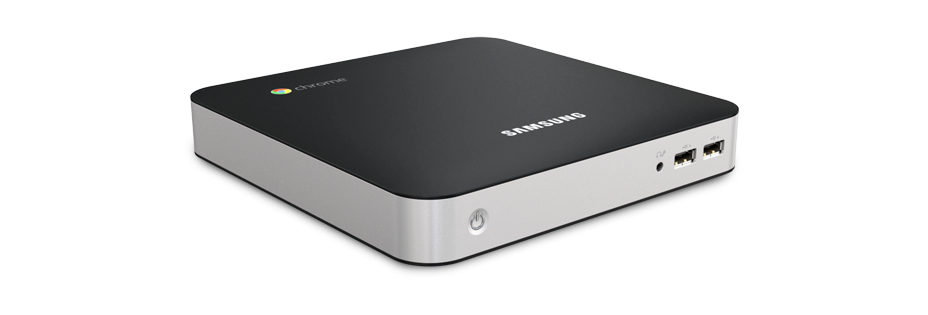
Chromebox
 Hopefully, the architecture of the Android or Chrome OS has reached a stage of maturity that it will not become any larger or require a better chip set to just to run.  The claim of the manufactures is that the Chromebox is future proof.  This is something that Windows has not been able to make that claim.  I have seen everything from Windows 3.0x onwards and will probably see Windows 9, 10 and ....     The Chrome box appears to address the increasingly less frequent need for keyboard and hardwired networking at cheap unit price (£270) with provision for HDMI which seems to be becoming the standard.  Traditional one connection type monitors appear to be a passing trend.  HDMI TVs are becoming very cheap and are built to last and are pretty robust.  Printers are not necessarily a future requirement in the digital classrooms.  

So stripping out the hardware requirement of providing for access to IT resources leads to consideration of the network environment.  Windows networks require administrators, technicians and specialised software to produce a safe working environment.  The solution offered by Google is through the Chrome set up http://support.google.com/chromeos/a/bin/answer.py?hl=en&answer=1289314.  This looks like a great solution especially for small schools which do not have access to technical expertise all the time.

A very Googlecentric  blog post but I personal think the Android/Chrome platform has a lot to offer.  The impact of technology should be there as a tool to be used appropriately and not because we have invested so much money in a lot of shiny boxes and need to use them!


Thursday, 18 October 2012

MOOCing: To boldly go where no one has been before!

MOOCING for all!


The age of the STAR TREK ACADEMY is here.  Distance learning was something that became included for younger members of the Star Trek Enterprise in the popular saga by Gene Roddenberry.  The concept was already there in the Australian idea School of the Air.  Now we have the MOOC!

Massive Open Online Courses have arrived with the sites such as edX, Coursera and ALISON (see links at top of the page).  In order to understand this experience myself (and to formalise my own self-taught learning) I have joined an edX course CS50X .

As part of a group examining online course delivery "based" (world wide collaboration via Google tools)  at a separate institution I became aware of the idea of MOOCs.  An article (http://sleve.wordpress.com/2010/09/27/why-mooc-engagement-is-so-hard/) was one that the Bank Street College  OFLC Course/Group recommended for reading.  Having read the article I was struck by the my own experiences using social media and the ways I have been instructed post 16 years old.  

In classes for A-Levels we had 30 per class for Maths, Physics and Chemistry but only 10 for Biology!  The engagement socially with the learning experience was better in the smaller groups as the interaction between tutor and pupil were easier and more immediate!   This  pattern of pupil to real-life tutor  experience continued through my Scottish University where we had classes of between 100 and 200 in size with tutorial time spent with a group of 7 to 8 pupils in the early years.  This last model was a better experience than Sixth Form A levels but owing to previous training of how to learn in a formal context was like being at school.  At later stages in the first degree experience we had increasingly less formal instruction in  "class" but there was still "traditional" engagement techniques.  After all these were research Professors with a teaching load of Undergraduates as opposed to teaching Professors! Plus they did not have the whizzy presentation to engage pupils as we have today and break up the delivery of material.

Having seen the first lectures of the CS50x course I was struck by the content compared to my experiences as an undergraduate 20 years ago.   Key concepts although delivered at quite an active pace were not that many in the 2 hour lecture/MP4.  What was apparent was the audience participation and the "pausing" to explain the learning outcome.  The online experience was also made more interactive and a non-popcorn/coke/beer movie experience by the occasional question appearing to check understanding of key concepts.  This is a simple but key trick to keep the solo listener engaged.  The peer pressure of note taking neighbours being absent in this environment.  That was also apparent in the auditorium the lack of note taking materials when we did see audience shots.  The material was online in the form of video recordings of the lecture, transcripts, Tutorial  materials and most importantly web-links (the most difficult thing to note down quickly).

The forums signed up for the and program critique requests  starting to appear, addresses some of the MOOC's social limitations.  It does require a collective interaction of learning.  It does require confident self-learners.  It does play to the strengths of undergraduate enthusiasm in asking the question, why? Or more important that very difficult statement , I don't understand.  This is the  a potential pitfall of MOOCs that social media can overcome by doing what most pupils from the age of 3 do without thinking they are doing it, which is peer to peer learning!  It is also a challenge to the "closed filing cabinet" state of traditional academic work.  If you are not on the privileged list of one to one personal contact that knowledge acquires a proprietorial existence. 

The universal aspiration of knowledge being free can be a reality but only if a MOOC  engages social interaction in a learning community.  Competition to be the first to think of an idea will always be there, social interaction dose spur uncovering of  new concepts.  Would we ever have known about Darwin's theories in his lifetime if he had not been in correspondence with Wallace?  Historians of life sciences argue who was the greater Wallace or Darwin? And who should be on the pedestal carved in stone?  MOOCs potentially have the ability to speed up dissemination of  understanding of knowledge but have to overcome the inertia of lack of communication between learners.  A problem experienced in UK, if not all UK classrooms, for the majority of pupils driven by need to fulfil a curriculum!

So the major conclusion of the article http://sleve.wordpress.com/2010/09/27/why-mooc-engagement-is-so-hard/, is to start to engage socially.  Be confident to record your experiences in a learning journal or blog.  And more importantly to be persistent and leave your "footprints" in the sand to see where you have been when you look up to see where you want to be!


Monday, 1 October 2012

Digital Classroom and Dyslexia

Opening access for people with Dyslexia


Look at any group of people in the UK and the chances are that between 5 and 10 % of that group are dyslexic. That is assuming that they have been tested.  The general population over a certain age would not necessarily be diagnosed but their difficulties in reading and writing may be still a problem.  In "Western" societies where proficiency in written communication is a judgement on how successfully people interact with their environment, this is a hurdle for the digital classroom.

How do you include 10% of the bell curve?  Clearly a solution for such a large group of people who may be excluded from the digital community to a greater or lesser extent has to work across many platforms.

A font known as OpenDyslexic is the possible solution.  A recent article  on the BBC website describes how this font has started to be taken up by many of the major apps and browsers.  I have downloaded and installed the extension to my browser of choice, Google Chrome. Using the settings and extension menu it very easy to check the box to enable and enable the app.  The only disadvantage would appear to be relative complexity of installation on Apple products.  As digital classrooms develop the choice will increasingly become one of Apple or Android (Windows 8 apparently is being enabled to run Android based apps).  The Tablets by Chinese company Huawei and the Kindle Fire by Amazon all work on  fork versions of Android (which itself is a derivative of Linnux).  Kindle apparently does not support font embedding so OpenDyslexic will not not work on a Kindle.  Samsung appear to use a non-fork version Android and will remain part of the mainstream developers.  The customer is not tied to the one provider of apps.

So, installation of the OpenDyslexic font.  First access the OpenDyslexic page (click the link on word OpenDyslexic).  Choose the tab get if for Get it Free! select your product.  It is as simple as that!

I will be adding the link for the OpenDyslexic font to the top of this blog.  A source of information regarding dyslexia is  the British Dyslexia Association http://www.bdadyslexia.org.uk/.  

Saturday, 29 September 2012

The Google Classroom: Planning a Course

The Planning Process

Very few teachers would want to walk into a room and be presented with a title and expect to teach for an hour.  We adopted a process orientated approach that is measurable against specific outcomes.  With this in mind the approach I am going to adopt is one of measurable outcomes both for the student and the planner.  I have had a lot experience of this approach to working.

In 1998 when I first joined a Middle School Suffolk a as newly qualified teacher with QTS (a level attained after a year of being a PGCE qualified teacher on most UK career tracks) having already gained a BSc in Botany, MSc in Crop Protection and worked as a Postgraduate Researcher in Fertiliser Technologies and sometime agricultural lecturer.   I took over the running of the science department and later added ICT to the responsibilities.  Two major departments in the scheme of producing effective learners.   

Within a few weeks of taking over we were Inspected by Ofsted and were put into special measures having already been given a notice to improve.  In the next few years (2 and a half seemed like longer) we had quarterly visits from HMIs (Her Majesty's Inspectors) who take over from where Ofsted leave off having  put a school into special measures.  Twelve years later I left this post as they shut Middle Schools in my part of Suffolk to move to a two tier system.

In that time I have seen many changes in what is looked on  as effective teaching and trained a few PGCE students. One of whom I met in another school in Cambridgeshire, where I spent some time teaching secondary as a supply or substitute teacher as per my original science expertise.  Thus my experience spans age groups 9 to 18, to adult.  

Primarily I am going to cover course building using Google Course builder from an educator of 9 to 18 year olds point of view.  Adult courses I will also cover but a little later.  So, the topic.  A universal topic for all science labs, Design technology and  IT use is safety.   I recently  renewed Safeguarding Training and was struck by amount of new legislation related to IT that was brought in in 2010.  However, the 1974 Safety at Work Act still applies (even in Schools) so  some of the legislations key points in child friendly terms are pertinent  especially as we are training them for the work force.   Good habits start early! 

So having rambled on about my professional provenance, does you good sometimes to identify achievements, to the planning process.  I mentioned in one of the last blogs the suggested standard of a Google Certified Course as opposed to a Google certified teacher, not so much an endorsement but a recognition that certain steps have been gone through to produce the course.  A bit like the Investors in People accreditation in the UK,  a record of the good processes being in place but not necessarily a record of  successful outcome of the good practice.

Wiki pages produced by  Google suggest some good practice so I am going to use this as the frame work for the common process with adding layers on top.   One of the  major assessments attached to online courses is the record of time spent on the course.      As mentioned in a previous blog there is a National Framework for Qualifications in the UK as well as in Europe.  More relevant to time spent on a course is the   European Credit Transfer and Accumulation System (ECTS).   A new innovation in Suffolk is the Suffolk Baccalaureate which a little controversially has been compared to new Ebacc proposed by Michael Gove.  Therefore as a change in the ground rules for qualifications is taking place any course produced has to be working to certain common international  standards to  have longevity.  This is possibly something the Google Teaching Community could look at.  While that discussion is initiated I will take on board to start with as I mentioned the Google planning framework.

So will be putting some "style pages" up for sharing based on the process outline on the Wiki Pages


Friday, 28 September 2012

Towards a Google Class Room

The fine print: How big?

Experience of making IT based resources in the past has taught me the rule: time spent making > time spent watching. 


 In the introduction of IT in the classroom though the UK National Curriculum the emphasis was on using lots projector based resources and whiteboards.  Assuming the equipment worked as it should do (ie whiteboards attached on the other side of  corridor walls that moved slightly due to cracks would always give a interesting experience)  which was rare presentations were not as well received as could be owing to concentration span.  Government produced framework material  guaranteed to cause mental turn off the quickest!

So with the view in mind of the resource rule number one (time spent making > time spent watching) I am looking to try and get in an ideal world a ratio time spent making to time spent watching down quotient of 1.  It is very easy to become technology orientated. You can forget that the 10 hours producing a resource may produce a unique technical application of your skills, but if one person sees it for it's 5 minutes duration the impact on overall learning is small.  Granted if more people see it then the ratio goes down.  

We can modify resource rule 1 for a time efficient resource to be: time spent making < collective time spent watching.  Remembering individually tailored learning experiences there may be a degree of temporal separation from the various learners.

Experience of "playing" with Microsoft Reader when it first became available to produce differentiated texts for individual pupils showed IT  was a resource hungry dead end.  Since then a lot of resources have been supplied if buy the "right " course for the exam board.  GCSE dumbing down apart there is a certain amount of recognition that not necessarily do we need to know how to produce the materials but know how to operate them.  An analogy is a bit like that photocopier in  a school where everybody knows how make a copy but very few know the difference between  photocopy safe acetates and ordinary OHP acetates (there are still some OHPs being used).  Or even more frequent there are some people know how to change the toner, fill the paper hoppers  and clear a jam, while others just cause them by pressing a button! 

How large can the resource be and what is the cost?  A look at the "Quotas page" suggests there is a 5  GB free allocation for data.  This is shared across the appengine applications (courses?) that you generate.  The size might sound a lot but could easily be eaten up with a resource rich content.  The daily useage quotas may be a little small for a large class with access and email limits if the free resource quota is to be adhered to.  A cost estimate would be a useful first step to make in the general planning stage.  This is also a good way to limit enthusiasm with  the first rule of resources in mind.

A suitable spreadsheet needs to be used to give a cost estimates and run as a financial model.  Having had a role with responsibility for resourcing an IT and a Science department budget control is a must as it also can generate time management as well.  Traditional lesson planning methodology in classrooms relies on resources being to hand.  Busy teachers do not always have time to reinvent the wheel in the non-It literate class room.  When I trained PGCE students I used to recommended planning of 20 minutes per hour of teaching when all the resources were available.  The what to teach should be there in the planning at the beginning of the of the period of instruction.  In among the Google Wiki pages, 30 minutes of content for each chunk of topic per session is given as a guideline.  Experience of designing Screen based resources has led me to the conclusion that for every 30 minutes of screen content allow at least a 2 hour planning window for simple content such as PowerPoint or Flash or even effective YouTube presentations.  This is something that the various curriculum strategies did not address when we having to be all singing, dancing multi-skilled  educators.

So the next blog will be looking a little further at the planning for cost and time budgets for the use of the course builder.  After all time is money?


Thursday, 27 September 2012

The Google Classroom

Online Course delivery


A variety of online courses are now on offer (edX, Coursera, ALISON).  Monitoring the Google Teacher newsletter there is now a set of course construction that they are making available.  

A set of Wiki pages (https://code.google.com/p/course-builder/wiki/CourseBuilderChecklist) outline the methodology of producing a course.  This may or may not lead eventually to a set of standards for Google accreditation for the course.  

An initial reaction is that the materials do require a degree of computer literacy beyond the average skills of a recent UK  PGCE graduate.  The skills are therefore arguably beyond the remit of a lot of the profession.

However, using some of the courses offered by edX, Coursera and ALISON it would be possible to acquire the skills.  The use of Google tools will probably become part of Education degrees as time goes on as tailored curriculum become more individual and compulsory.

In the next few weeks I am looking to get to grips with the software and looking to relate the development of a course for my own purposes.  As a former Head of Department for Science and ICT in a middle school I will be looking to develop initially short courses on analytical skills in Science and Safety.

So grab the Python by the tail and see what happens!