Showing posts with label Google Course Builder. Show all posts

Friday, 28 December 2012

The Friday Reflection

Cat thinking it's in Charge!  You
probably realise it's an old photo!

Last thoughts for 2012?

Well we all survived the Mayan End of the world, didn't we?  I hope the festive period lived up to all expectations.  Now we are in that period of reflection for most who are not returning to work until at least the 2nd of January 2013. The end of the year review not quite ready for today but then we still have 3 days left of this one to go! 

The week has certainly been busy.  I have taken the view that if I am to grow the Haverhill Online Learning Community I would need to try and interest people in the time that they might be bored with festive TV.   The time on their hands might be pushing them towards career or lifestyle choices for 2013.  Their New Years Resolution list of good intentions is being written. With this in mind I have been avoiding the pub and the once a year drinkers and committing as much to possible to the websites, blogs and Google Plus communities.

I have picked up a few members before Christmas for the Learning Community whom I am very pleased to have on board.  I have set out a calendar of events to give a bit of focus to HOLC (Haverhill Online Learning Community).  The use of Google+ Hangouts, SlideSpeech (many thanks to +John Graves for this resource) and Google + Communities within the context of the interactions between the community I hope will prove enlightening.  The Circles feature is also being used (I will have to review some of them for relevance) to not so much as fine targeting tool but a  broadcast medium.  I have noticed there are many Google Plussers in the same circles.  It would be interesting to find out how many active Google Plussers there are actually out there!

The first resources for HOLC projects have been uploaded, a "100 Grid" for Keys stage 1 and 2 Maths for parents to download for their children to use or use with them.  A SlideSpeech presentation is needed to illustrate it's use but that should be be a mere trifle, hopefully.  This fits in with the first project on the Calendar Maths for Parents Week and the Number Square page.  Later topics range from Lifestyle and Leisure topics such as Local History, Hactivate Nursey Rhymes.  The work-life balance topic focussing on a degree of cross over in wellbeing is the Introduction to Telework Week Project.  This is one of my interests as a former director of the Telework Association. I will be building up a bank of materials and using the Google+ Hangouts and Communities Group to explore this topic in the context of Haverhill, a rural area.  A follow up week is planned to coincide with one of the local trade exhibitions.

Revisiting the Online Learning Collective is a priority.  I have not yet in the busy time of the last few weeks written the Python code for the Google Course Builder Project:  Project Scratch.  I have invested in a Kindle Textbook Core Python Programmng  and am busily ploughing my way through this, along with a few diversions into Sicily with Inspector Montalbano.  After all it is supposed to be the holidays! 


Tuesday, 25 December 2012

12 Online Learning Experiences

21st Century Education

Christmas morning up and awake a bit of time before the house erupts with bouncy spaniels and excited children (some in their first childhood others in their second).  A good time to start to list some of the educational tools and VLEs I have used or become aware of over the years.  These are the most prominent, the ones that immediately spring to mind and are in no particular order.  If I miss one that is your favourite please add a comment or Google+ article or +Philip Spalding.   This links in with the ukonlinelearningcommunities project (medium term plan).  So twelve applications for Christmas!  I make no apologies for including so many Google offerings!


1. Google Plus Hangouts

Really like this application for allowing online real time collaboration.  A normal Google Plus account allows 10 users to interact.  A Google Apps for Education or a Google Apps for Business Account allows up to 15 people to interact.  That interaction can be then be streamed to a greater audience using your YouTube Channel where they can watch and listen but not join in!  Also allows the recording of the experience for future reference! 

2. SlideSpeech

A great way of converting your presentation to a learning experience that narrates the presentation.  An example I have constructed can be found at (http://slidespeech.com/s/kaTJthHeen/#slide0-slide).  More information on applications of SlideSpeech can be found by contacting +John Graves.  


3. StudyRoom

This is the study room facility used by Coursera and edX.  Our own Online Learning Community (Haverhill Online Learning Community) has secured a study room which we will be using extensively in the year as we grow our learning community.  Thanks to +Amadeus Malca for making this happen.

4. Blackboard

This is the traditional "biggy" in Virtual Learning Environments.  I have recently become an online tutor for Apricot Learning Online  who use this platform and after the training I have to say impressed with the scope of Blackboard.  Real advantages are the ability to structure personalised learning through Session Planner, speed of use and it's flexibilty.  The underlying technology is also very suitable for Safe Guarding vulnerable individuals!      

5. Moodle

This could be billed as the alternative Blackboard.  It is an opensource platform used by a few in the UK such as Oxford University for some of it's online CPD courses but has a greater following in the US.  Is best set up as a server based application, requiring downloads such as MySQL and PHP.  Personally have tried to load this to a single machine but had difficulties setting up the database first time.  Runs best on Linnux based systems, and as OpenSource is free.  Can see a lot of mileage in this one but will need to set up database properly if I am to use it in some of my commercial based activities (ie the not profit exceptions) through KritiRecharge2012.co.uk , the site is currently under construction and revision.


6. Hot Potatoes

A real old favourite of mine.  I have been using using this as long as it has been available, which must be at least 7 years.  Great for making small exercises quickly and saving as a HTML file that can either be added to a website or loaded from a machine locally.  First real application that allowed quick solutions to making child friendly exercises to support individual pupils in the classroom.  


7. Google Plus communities

What can I say? This is a staggering simple concept of the village green or local pub or coffee shop.  Really like the fact that technology behind the social interaction retreats into the background!  I have waxed a little lyrically  in the Blog post http://ukonlinelearningcommunities.blogspot.co.uk/2012/12/google-plus-comunities.html .

8. Scratch

The new methodology that is going to save British Computer Programming in schools?  Remains to be seen  but great programming interface.  Even features as the introduction to edX's CS50x Introduction to Computer Science 1, which I am currently working my way through.

I have also run successfully an online summer school based on Scratch.  However, that was before I discovered all the cool tools of Google Plus (but then a lot of them were not available then).

9. Google Course Builder

The potential to be the Rolls Royce solution in a moderately tech literate teacher's hands.  Have dabbled a bit in the mechanics while particpating in +Jeannie Crowley OFLC at the Bank Street College of Education in  New York's, which has now become the Online Learning Collective.  Have great ambitions to be using Google Course Builder regularly throughout 2013.

10.  Blogger

Probably my most used and useful social media platform to track my transition from traditional teaching to entering the realms of 21st Century Learning practitioner.  Have been blogging now for 2 years.  Very surprising how things have changed even in that short space of time!

11. Google Docs

The key technology for collaborative learning and sharing.  So much of a cornerstone easy to forget how important it is the development of the Google experience when other innovations such as Google Plus have come appeared. 

12. Google Apps for Business/Education

The nemesis of the web developer who has thrived on £100+ per page fees for designing static websites? Maybe! Hopefully!  The same applies for Education (Google Apps for Education).  Great tools for reducing the hammer from a platinum plated tool an insignificant pound shop (99 cent shop) variety.  This is where the threshold to true digital working and learning starts as the entrance costs have become minimal.  Looking forward to a more educated world in the next two decades!  One where everybody has access to free basic education!

Most of the above tools are free.  The time to master them is also becoming less and a lot of the operations of the tools within the applications are similar across learning platforms.

So here's to the next two decades of freely available education! Merry Christmas! 

Friday, 23 November 2012

Friday Reflection

Back in the Swim!

At the end of last week I reflected again as to how the week had gone.  Well back in the swim well and truly now.  One of the tasks for the week was to take the next steps to establishing a Haverhill Online Learning Community.  After making contact with a number of people in local organisations to float the idea on Friday last week, I decided to take the plunge.  

On Sunday I re-established my own domain presence again on the internet after about a year's re-evaluation and consideration.   I used Google Apps for Business to set up the domain kritirecharge2012.co.uk.  The process was so simple and cheap compared to other packages that I have used.  The DIY approach suits me since I have a lot of experience of dealing with Templates and modifying HTML.  The tools provided were simple to set up (but then I have experience of Google technologies) groups, Google +, Blogger, WordPress and the website.  The website has been launched for Haverhill Online Learning Community (HOLC).  The website can be found at  https://sites.google.com/a/kritirecharge2012.co.uk/haverhill-online-learning-community/home.   Please follow the link and view the site.  Visit the Google + site from the link to see how the project is developing.  The site is almost complete in outline only the mission statement needs to be looked at but should be complete over the weekend.

We have a number of collaborators interested in joining the community.  If you are able to offer help and advice please contact via the Contact Us page on the website.  We have a number of projects for collaboration proposed including a Hacktivate Nursery Rhyme book and a Local History Project.  A CPD project for Teachers of Key Stage 2 and Key Stage 3 on how to programme with Scratch is included.  This is the project  already under way with the Bank Street College of New York's Online Faculty Learning Community.

The journey has begun to 21st Century Learning and 21st Century Working.  A good link to find out more about 21st Century Working is the Telework Association.  A body from whom we now have support in the role of an Online Learning Community.  We will be developing courses that will be available on the HOLC website showing  how to go about flexible working and teleworking.

A busy week coding for Google Course Builder is coming along will have to share some code both on the HOLC site and the Bank Street OLC.  So more of the same needed.

For next week, now the site set up and the bare bones of the HOLC stablished it is a time for consolidation and delivering content and connections.  The day job is starting to take off again (must be the season of cold, teacher training).  I have spent yesterday and will spend today in the Isle of Ely area teaching at a very good Academy. Always good to keep your hand in!  Looking forward to seeing how  HOLC develops!


Thursday, 15 November 2012

Friday Reflection

Treading Water!

The Friday reflection has come round again, well Thursday evening. It is Friday already somewhere in the world. Have been having a bit of week of treading water.  A week of considering whether that hillock is the top of the mountain or only anthill that could have been avoided without disturbing the occupants.

To start off with, something that I have learnt this week.  I found out when  reading and posting to Google+  that there was a hump day.  Being in the UK I was a little puzzled.  Camel support day?  But I was politely informed it was Wednesday by another name.  So over the hump I went.

I have had a little review my own personal experiences of completing courses and lack of engagement afterwards.   This led me to conclude that there is a place for the Everlasting Class to become a new forum for professional dialogue.  A Networking opportunity not limited by geographical boundaries.  In a small country like the UK relatively short distances with congested infrastructures are such barriers.  Google+ Hangouts  can be a solution.  I was unable to attend a local meeting of Best of Haverhill , owing to a few conversations via mobile phone, discussing a very worthy topic of reconnecting Haverhill back to the railway.   We had our rail link removed nearly 47 years ago in a so called rationalisation.  In my apologies for absence on the Best of Haverhill Event Facebook page I suggested that a Google+ Hangout or YouTube channel broadcast would be ideal for small business owners to be informed of such an important topic. We will see what comes of that.

On Wednesday (my Hump day apparently)  I blogged on the topic of the changing mantras of UK education.  The article that prompted my meandering  was  thought provoking as it gave insight on the influences of our current Minister for Education.  The book that he was most influenced by according to the article promoted the ideas that there were no individual learning styles.  That rigorous testing was good for the development of learners and should be the norm.  Without having read the book yet I am not in a real position to comment (sitting on the fence?).  I haven't found a Kindle version of the particular book.  Amazon  do have it for sale in print version.  However, I predict that that the book may be a mini-bestseller as every Head Teacher, Deputy Head and journalist will clamour to buy a copy in a bid to understand the future path of education in England and Wales (Scotland has it's own apparatus for mass education).

After one of the pillars educational thought had been questioned how did this affect my perception of Open Learning Communities (OLC also stands for Online Learning Communities).   A reference to the Royal Society in Tuesday's blog and it's origins prompted a comment from one collaborator of the Bank Street OLC.   The  original format for Royal Society meetings was a kind of "show and tell".  He was interested how this element could be introduced into Google+ Hangouts.  Smartphones were mentioned as a possible tech solution.  The new Nexus range launched this week could be in the part of the enabling technology.  Especially if there are front and back mounted cameras that can work independently in separate Hangout Windows.

So how did I do with the plans for this week.  Well I have edged a bit further along the path to coding and producing a Google Course Builder application.  Still a little way off.  Have to catch up with the edX and ALISON courses. Did use Study Room   for the edX course.  Interesting experience, a bit like a game navigating the Avatar to interact with other students.  Have not yet blog posted the updated Virginia Tech thoughts.  May look at the context again to see if it is Learning Style independent.  First thoughts are that it is since it works on the student-instructor continuum.

So for next week.  I will look at how OLC could be set up in the local area for Haverhill and float some ideas.  The coding courses really need to be caught up with and put back on track.  Long Term plan may need to be completed!

Well just about cat is in front of fire.  One side is done the flip side soon to happen.  Think I will join her next to the fire as it starting to become very wintery in Suffolk!  

Friday, 9 November 2012

Friday Reflection

Online and overland communication!

In a week when Sandy premièred in New York followed by snow,  the power of the internet for meetings and connections was for me reinforced.  The Wednesday hook up or Hangout happened  attended by other members of the Bank Street OLC.  Microphone problems aside it was possible to carry out a meeting, even though I was resorting to chat messaging, that was a thoughtful and provided new perspectives for my own practice.  The fact we could speak in real time across three continental shelves leads to greater understanding of for example terminology and other descriptions of online learning activites.

This week I have been chipping away at my own black box understanding where coding and computer science is concerned.  I am part the way through an Alison Diploma course on Programming in C.  The basis to the reasoning for attempting this I have blogged about in my last post.  I have had a look at the Wiki pages for Google Course Builder and will start looking at putting the materials together for Project Scratch.  This is a  CPD project for teachers to start to learn how to code using Scratch.

Thursday, yesterday, I embarked on an overland journey to talk to a small, expanding company run by very pleasant people. They have selected a particular niche in the online education sector.     Delivering learning to groups of pupils via virtual learning environments.  The model they are following is try to get the pupil to be immersed in the activity and have ownership. 

They are based in South Gloucestershire   After becoming lost trying to follow Google maps and drive at the same time I can understand why. The nature of 21st Century working is Teleworking (a representative organisation in the UK is the  Telework Association).  Their's is a prime example of this activity. 

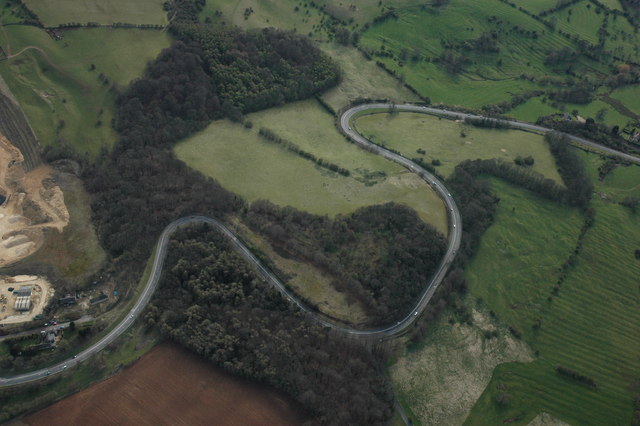
Fish Hill a 1 in 10 hill with great views
A Cotswold town
So after driving down Fish Hill (and back up again) I arrived in the Cotswold town.  As you can see a chocolate box High Street.  It is close to Sudeley Castle.  Having spent nearly five hours getting there I have to say the purchase of a discounted Road Map most valuable item bought this month (silly me thought I could just rely on Google Maps' directions forgetting the vagaries of UK highways Authorities signage and desire to redesign road layouts).  Prior to this purchase I had been following my nose and luckily it was working properly and I was only 15 miles from where I needed to be.  The map will be accompanying me Google Maps just there to calculate journey mileage and potential time!!  A lot of miles (500 or so) to eventually get back to Suffolk at about 4.30 pm, (left at 5.30 am that morning) but worth the trip to see how others are approaching the task of online learning.

Returning back to the reflection.  Last week I set myself the task of looking further at the Virginia Tech Model of learning activities .  I have developed my thinking a little further to include representation of the model as scattergram.  Included has been the step to incorporated a the model of Revised Bloom's Taxonomy and Vygotsky's Zone of Proximal Development.  This has been shared with members of the Bank  Street College OLC.  I will update the blog later to show the new model additions.

So for next week.  To pursue further leads for collaboration within the OLC group to move forward Project Scratch.  Blogcast the ideas of extending the Virginia Tech Model.  Continue to look at coding since we have an OLC deadline/waymark coming up and want to be able to have at least an outline project working.  Like the idea behind the NYC Learning Hive.  Have viewed the new initiatives launched in the UK by Mozilla.  A Hive or OLC is really appealing to set up with local volunteer centre (for whom I work with from time to time) and the local council.

Weekend starts here, POETS day being enforced (Push Off Early Tomorrow's Saturday!).
 

Tuesday, 6 November 2012

Coding for Google Course Builder

Stepping up to Code

Over the past fifteen years or so I have flirted with coding in my position as Head of Science and Head of ICT in a middle school.  The requirements for coding has not been a part of the UK education systems' relationship with computers in the classroom.  The use of WYSWYG applications such as Macromedia Flash, Microsoft's FrontPage is about as close as most  teachers of ICT have come to coding.  We now have a need for coding skills in schools.   

Having tinkered about with coding in HTML and other languages along with  a very long ago remembered relationship with early BASIC and Machine Code a formal "Hello World" approach was needed.  So looking for a "modern" start I enrolled on the edX course Computer Science CS50x.  This is a whole semester course (half an academic year to those of us used to British University systems of terms).  So far this has been a great course, something that should feature in Year 1 of all UK university courses no matter what your discipline as a core passing course (ie you not do have a grade just pass or fail).  Certainly something similar  would have been useful later when I was grappling with analysing data from large field and pot experiments for efficacy of fertilisers.

For the short term I needed to get up to speed again (?) very quickly with how to code.  I selected a course from ALISON.com , Diploma in Programming in C.  Having had a little experience with C,  I started to work my way through the course.  A little hard to follow as a lot of information delivered by white board and screen capture, since there are no notes to download.  This is in contrast with the edX course where there are full transcripts of the lecture and the possibility to download resources to go on your iPod Touch, MP3 player, PDF on Kindle etc.  The ALISON course is quite taxing on the memory where assessments come about with 80% pass rate needed for the assessment.  It is possible to bale out and restart the start the test.  I needed to do this twice since the string reading for the answer and the  question were often not specific enough to allow success.  A feature of validation is that at any time after certification you can  login and sit a test again to validate your understanding for anybody that is interested.  This makes sure that skills are maintained to be current apparently.

So tools downloaded and followed  so far with ALISON are the Codeblocks C++ compiler .  A useful website is  Codepad which is an online compiler and more importantly also covers Python.  Python is used with the SDK AppEngine to create Google Course Builder e-Learning Courses.   Python also seems to be embraced as well by the Raspberry Pi community.  

So conclusion can now programme a little more efficiently  in C++ with a better understanding of the Computer Science.  Next step is to start to get to grips with Python and look to writing a Google Course Builder App!  

Thursday, 25 October 2012

The Right Slate!

The Roman Wax Tablet
(from Vindolanda)

Technology in the classroom!


On the face of it the use of a tablet is today a "new" concept.  The advent of cheap paper has led to the prevalence of a one time use recording medium.  The Roman Wax Tablet and the Victorian slate with hard or soft (chalk) stylus. The Victorian slate is still within living memory, especially with some of the 80 year olds who frequent my local pub!

So on the face of it paper in the classroom for recording thoughts has a relatively short history of general use.  The re-emergence of the age of the tablet age in the early 21st Century is  another milestone in mass education.  


The Victorian Slate
Looking at the Victorian slate the shape would be instantly recognisable to any child over the age of 4 (probably younger).  It's purpose apparent as long as the stylus was present. Cheap and abundant materials, often recyclable as  "everybody" had a slate roof in the Victorian Britain, that can be made into a essential classroom tool.

Here is the sticking point.  Cheap materials and universal access to the tool.  Manufacturers of learning tools, in this context tablets, have quite rightly used patent law to recoup their investment. The ongoing litigation between two major companies as to who invented the "wheel" is  possibly going to delay some of the take up of both products.  The entry cost and the propensity for updates or new operating systems is another headache.    


Google's latest offering, the Nexus 7 is a tablet I really like.  Experience of designing and procuring a whole school IT system, makes me wish there had been a solution such as this ten years ago.  The  cost per unit of £159 is reasonable could be a lot cheaper.  Android based tablets running Ice Cream Sandwich and Jelly Bean are available and perform the function but may not have the big brand coolness of a Google or for that matter Apple (there mentioned it) product.   

I have to admit I have only used a Nexus 7 so far in a PC World store.  I had until 4 months ago a Scroll tablet running Android 2.0x, and a USB keyboard/case.  This was all well and good until I signed up for the Telegraph Newspaper for Android.  Having not read the small print that the Telegraph content required Ice Cream Sandwich (Android 4.0) my experience was a bit curtailed.  The reason: the Scroll tablet was not powerful enough to be updated to Android 4.0.  The tablet had been bought about a year or 15 months ago, so really early in the evolution and visibility of Android tablets, and already was not able to run the latest Android.  The ARM race (pun intended) was  only just starting.  

Use of Google type hangout technology and other Google Apps for Education even removes the need for expensive projectors and Whiteboard Technologies.  The ownership of a single tablet through a pupil's learning journey is a bit like the Scientific Calculators we used to buy when we were 12 (pre-PC in the classroom).  I was using mine right through 1st year University Physics and beyond.  Increasingly pupils are being encouraged to carry internet enabled in schools as an aid to learning.  The distraction factor of these technologies and the monitoring of on task behaviour may become a problem initially especially with the  "Facebook Addiction" problems a lot of educators are concerned about.  Bluetooth may be one technology that could make a comeback within rooms.  It may also address some of the "open network" issues that fall in the remit of Safeguarding.   

Longevity of technology is a  key factor as much the physical layout of the learning environment.  Many traditional classrooms do not readily lend themselves to being digitised.  The schools building programme in the UK is a contentious issue with standardised  layouts being proposed that appear to rectangular boxes a bit like a shipping container.  These is even a designated cost per square foot that cannot be exceeded unles schools pay for it themselves (http://www.bbc.co.uk/news/education-19787570).   


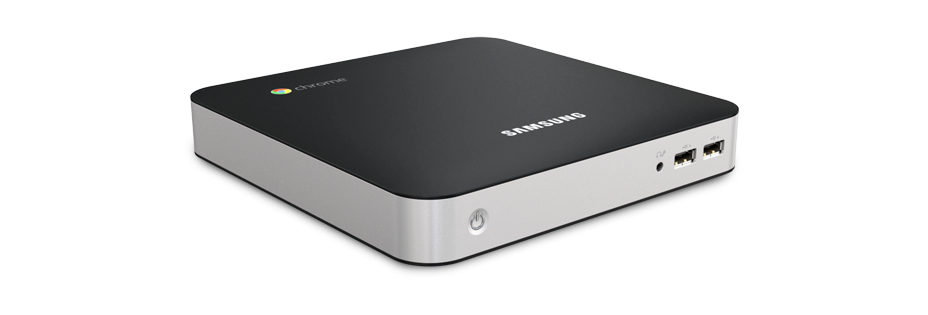
Chromebox
 Hopefully, the architecture of the Android or Chrome OS has reached a stage of maturity that it will not become any larger or require a better chip set to just to run.  The claim of the manufactures is that the Chromebox is future proof.  This is something that Windows has not been able to make that claim.  I have seen everything from Windows 3.0x onwards and will probably see Windows 9, 10 and ....     The Chrome box appears to address the increasingly less frequent need for keyboard and hardwired networking at cheap unit price (£270) with provision for HDMI which seems to be becoming the standard.  Traditional one connection type monitors appear to be a passing trend.  HDMI TVs are becoming very cheap and are built to last and are pretty robust.  Printers are not necessarily a future requirement in the digital classrooms.  

So stripping out the hardware requirement of providing for access to IT resources leads to consideration of the network environment.  Windows networks require administrators, technicians and specialised software to produce a safe working environment.  The solution offered by Google is through the Chrome set up http://support.google.com/chromeos/a/bin/answer.py?hl=en&answer=1289314.  This looks like a great solution especially for small schools which do not have access to technical expertise all the time.

A very Googlecentric  blog post but I personal think the Android/Chrome platform has a lot to offer.  The impact of technology should be there as a tool to be used appropriately and not because we have invested so much money in a lot of shiny boxes and need to use them!


Friday, 19 October 2012

Away from the Chalk Face!

The Friday Ladder:  Grimes Graves, Brecklands
http://en.wikipedia.org/wiki/Grimes_Graves  

Friday at the finishing post!

A Friday morning, still dark at 5.45 am (UK time),  time to see where we have been since Monday morning.

The picture of 5000 year old industry to the right is a very apt hook for this blog.  On Monday I started the odyssey away from the Chalkface.  

The semester for edX's CS50x (see link above in bar) commenced on Monday .  Semester strange term to the English eye, where terms are more usual linked around the major holiday periods.  Eleven weeks for the lecture cycle.  This is an example of MOOCs ( see previous Blog), an interesting experience of viewing lectures remotely.  A little bit of Scratch was introduced (something that I have used in a Summer School that I ran), an assignment to be completed.

Wednesday saw the start of an interaction with Bank Street College of Education, New York.  In this interaction/course, with online resources and courses interaction seems a better description of the experience,  we are as a group seeking to push forward our collective and individual understanding of VLEs (Virtual Learning Environments) for want of a generic term.  There at the moment does not appear to be a classification yet of the different types of learning experience available on line.  To this end I have created a GoogleDocs Spreadsheet for viewing trying to classify the types of learning experience and some of the terms used.  As with all new areas different people have used what to them is the most appropriate term.  As an educator I am more interested in the learning outcome based upon these tools rather than the elegance of the tool.  If it takes 10 hours to produce a whizzy presentation that lasts five minutes that is 9 hours and 55 minutes too long in an ideal world!

So having had the traditional platform of undergrad teaching transferred to the digital world with edX this week, what is happening next week?  Further exploration of the topics on the edX course will happen, I have to say that I am impressed by the level of support materials provided.  How this translates into something that can be used in the Virtual Classroom ( there another term ) would be an area to explore within the  OFTL interaction with Bank Street College.

A clear link for classroom teachers between learning  objective and learning outcome needs to be made with appropriate selection of the best IT resource.  Interactive Whiteboards are fine but not if the wall on which it is mounted moves due to poor workmanship (have experienced), or the room is the wrong shape for projection with pillars at inappropriate places.  (Architects please note this when designing new buildings).  

The cost implication is also a consideration in the especially in the UK at the moment.  The investment in computers we made many years ago has produced the model where we are often tied to particular delivery equipment and mechanisms. This is often due to the fact we have bought a system rather than analyse first what we want to with it!  (Headteachers are often guilty of being impressed with the look at the package what it can do in the hands of the salesman and say wow must have this, then it sits under a cloth in the corner of the room to be wheeled out when Inspectors arrive!)  And more importantly we may have neglected to audit the training requirement of staff who are going to use the equipment.  This is actually more difficult to do than it would at first seem owing to the human factor.  A period of sending round survey forms asking which IT resources staff used and what they would like often drew a blank, but many good intentions to fill out the survey to shape the experience.  This is because  most teachers in my experience are still not  100% confident the technology will work when they want it to work!  It is an after thought!    

To see the spreadsheet, initially, if you email me through the Google+ network or leave a comment I will email the link.  The spreadsheet is work in progress.  

So weekend maybe have a look at some Sicilian food http://2pointfiveageofman.blogspot.co.uk/2012/10/sunday-foodie-bit-sicilian-cookery.html!  There is life beyond the Chalkface!


Thursday, 18 October 2012

MOOCing: To boldly go where no one has been before!

MOOCING for all!


The age of the STAR TREK ACADEMY is here.  Distance learning was something that became included for younger members of the Star Trek Enterprise in the popular saga by Gene Roddenberry.  The concept was already there in the Australian idea School of the Air.  Now we have the MOOC!

Massive Open Online Courses have arrived with the sites such as edX, Coursera and ALISON (see links at top of the page).  In order to understand this experience myself (and to formalise my own self-taught learning) I have joined an edX course CS50X .

As part of a group examining online course delivery "based" (world wide collaboration via Google tools)  at a separate institution I became aware of the idea of MOOCs.  An article (http://sleve.wordpress.com/2010/09/27/why-mooc-engagement-is-so-hard/) was one that the Bank Street College  OFLC Course/Group recommended for reading.  Having read the article I was struck by the my own experiences using social media and the ways I have been instructed post 16 years old.  

In classes for A-Levels we had 30 per class for Maths, Physics and Chemistry but only 10 for Biology!  The engagement socially with the learning experience was better in the smaller groups as the interaction between tutor and pupil were easier and more immediate!   This  pattern of pupil to real-life tutor  experience continued through my Scottish University where we had classes of between 100 and 200 in size with tutorial time spent with a group of 7 to 8 pupils in the early years.  This last model was a better experience than Sixth Form A levels but owing to previous training of how to learn in a formal context was like being at school.  At later stages in the first degree experience we had increasingly less formal instruction in  "class" but there was still "traditional" engagement techniques.  After all these were research Professors with a teaching load of Undergraduates as opposed to teaching Professors! Plus they did not have the whizzy presentation to engage pupils as we have today and break up the delivery of material.

Having seen the first lectures of the CS50x course I was struck by the content compared to my experiences as an undergraduate 20 years ago.   Key concepts although delivered at quite an active pace were not that many in the 2 hour lecture/MP4.  What was apparent was the audience participation and the "pausing" to explain the learning outcome.  The online experience was also made more interactive and a non-popcorn/coke/beer movie experience by the occasional question appearing to check understanding of key concepts.  This is a simple but key trick to keep the solo listener engaged.  The peer pressure of note taking neighbours being absent in this environment.  That was also apparent in the auditorium the lack of note taking materials when we did see audience shots.  The material was online in the form of video recordings of the lecture, transcripts, Tutorial  materials and most importantly web-links (the most difficult thing to note down quickly).

The forums signed up for the and program critique requests  starting to appear, addresses some of the MOOC's social limitations.  It does require a collective interaction of learning.  It does require confident self-learners.  It does play to the strengths of undergraduate enthusiasm in asking the question, why? Or more important that very difficult statement , I don't understand.  This is the  a potential pitfall of MOOCs that social media can overcome by doing what most pupils from the age of 3 do without thinking they are doing it, which is peer to peer learning!  It is also a challenge to the "closed filing cabinet" state of traditional academic work.  If you are not on the privileged list of one to one personal contact that knowledge acquires a proprietorial existence. 

The universal aspiration of knowledge being free can be a reality but only if a MOOC  engages social interaction in a learning community.  Competition to be the first to think of an idea will always be there, social interaction dose spur uncovering of  new concepts.  Would we ever have known about Darwin's theories in his lifetime if he had not been in correspondence with Wallace?  Historians of life sciences argue who was the greater Wallace or Darwin? And who should be on the pedestal carved in stone?  MOOCs potentially have the ability to speed up dissemination of  understanding of knowledge but have to overcome the inertia of lack of communication between learners.  A problem experienced in UK, if not all UK classrooms, for the majority of pupils driven by need to fulfil a curriculum!

So the major conclusion of the article http://sleve.wordpress.com/2010/09/27/why-mooc-engagement-is-so-hard/, is to start to engage socially.  Be confident to record your experiences in a learning journal or blog.  And more importantly to be persistent and leave your "footprints" in the sand to see where you have been when you look up to see where you want to be!


Monday, 8 October 2012

Raspberry's and Pythons!

Raspberry Pi, an education platform!

Raspberry Pi, low cost credit card sized computer , has initially been put together by the charitable trust that designed it as an educators platform.  The primary intention to educate the young (under 18 year olds) in the mysteries of computer architecture and programming.  

A step back to the days of self build computers in the late seventies and early eighties.  I do remember buying Personal Computer World and looking at the Commodore PETs and wincing at the price beyond my pocket money.  Migrating to the more techie magazines where bare boards could be bought and made up the costs again seemed to escalate.  The Sinclair ZX80  arrived, still too expensive (half a weeks wages for the average for the worker) then the ZX81 (I finally managed to own one of these).   Then came Windows! 

Each time a new "consumer" computer arrived the machine became more enclosed and a black box culture started to emerge of plug and play.  In amongst this the educational use and then the UK National Curriculum for IT or ICT arrived.  This sought to educate people in the end use of technology as opposed to understanding the technology. The lack of understanding of what is within the black box was obscured by the use of WYSWYG applications that bridged the gap between hardware understanding and programming skills.   Basic engineering and STEM (the new buzz word) skills were no longer there since the cost of the item was so expensive tinkering with the engineering was naturally shied away from.  The Raspberry Pi again gives this feel of a new start to computing.  

Raspberry Pi is a Linnux based system with the operating system stored on an SD card which in effect is a solid state hard drive.  This comes in various different versions and images downloadable from the Raspberry Pi foundation.  The interesting feature for me at the moment is that the latest images are supporting Python.  Python is one of the fundamentals to Google Course builder.  As system is Linnux based, a precursor of Android and uses an ARM processor it should be possible to get the Raspberry Pi to run the App engine.  

Manufacturing of the Raspberry Pi has only really just started to go into volume.  At a price of £35 for the basic unit a more economical way of ensuring cheap access to the digital classroom than an Apple or a Samsung solution.


Thursday, 4 October 2012

Google Course Builder: Pythons and Apples

Android vs Apple

A school decides that that pupils can keep their mobile devices on.  This may go against most school policies but will become more common.  This is the choice of a Federation of schools in Cambridge.  They have gone down the route of having work available on the website.  IPods are the device of choice.  IPads would be even better.  Having a niece attending the Federation the cost implication is something that this of concern.

The cost of using the mobile device for data transfer is prohibitive if it with 3G connection.  The coverage in East Anglia is quite sparse outside the A12 and A14 corridor.  So WiFi hot-spots would be the connection of choice.  The so called free WiFi operated by most internet providers are not actually free as you have to be a subscriber to that IP.  "Public" WiFi within a school usually requires a key or Login, a bit like a Fon account.  In Cambridge there is a cheaper alternative the Cambridge Matrix outside of school, allegedly there are many places in Cambridge where access is actually free.

Assuming the connection you have is cost effective what should parents be consulted on if they are being asked to buy the device that enables the education.  The choice is obviously now between two platforms Apple based or Android based.  The speed which Apple appears to be turning out new products is a bit like a post cold war arms race.  Can parents afford to have the most recent Apple incarnation?  Question need also to be asked on the reliability of the technology and ethos of releases  as Apple struggle with complaints of  handset   quality and access to Apps. This also against the background of the reliability of Apple suppliers as their Chinese suppliers experience industrial unrest!

Android is available across a number of different suppliers.  The solutions are often cheaper than Apple's and may with Android based operating systems have greater longevity.  The use of  an Android fork version by Amazon for it's Kindle Fire tablets, Google's own Nexus.  The Nook (Barnes and Noble's) offering also provide some new insights to 21st Century digital classrooms.  The big question is what is driving this the needs of the students or needs of the needs of the companies' to establish their product as the must have educational tool to exclusion of other platforms.  

Sitting in the background is the Software giant Microsoft.  I can consider myself one of the first generation of IT literate teachers to be trained.  Owing to the nature of Geography and the School Centrered Initial Teacher Training Course in 1996 to 1997 we were provided with Laptops.  In conjunction with BT had the possibility of using video conferencing to link up schools and training sites in the hinterland of the north east Essex coast.  The Microsoft Academy status of some schools has in my limited experience of being attached to a said Microsoft Academy had not been implemented across whole school.  Looking at the website again it appears to be again a system designed for large organisations and expensive laptop and PC solutions with  limited portability between institutions unless you are a licensed Microsoft Academy or educator.

So the choice.  On strictly cost basis both for educator and student the route of Android would seem to be most likely to promote longevity of resource relevance both technological and economically.  This is also a consideration as the nature of classrooms change for 11 to 18 year olds where the educator does not need to be in front of the pupils all the time.  Investment in buildings is increasingly becoming a concern in the UK, the size and shape of schools is proposed to be standardised.  Digital classrooms and virtual classrooms will increasingly be looked at especially by rural education providers.  As school transport becomes more expensive educating pupils in their own neighborhood in smaller groups in rural areas may become an option for part of the week.  The term Teleschooling may become an everyday term. 

So more Google Course builder investigation.  Today I am downloading Python and preparing to have a go at my first coding in the next few days.


Saturday, 29 September 2012

The Google Classroom: Planning a Course

The Planning Process

Very few teachers would want to walk into a room and be presented with a title and expect to teach for an hour.  We adopted a process orientated approach that is measurable against specific outcomes.  With this in mind the approach I am going to adopt is one of measurable outcomes both for the student and the planner.  I have had a lot experience of this approach to working.

In 1998 when I first joined a Middle School Suffolk a as newly qualified teacher with QTS (a level attained after a year of being a PGCE qualified teacher on most UK career tracks) having already gained a BSc in Botany, MSc in Crop Protection and worked as a Postgraduate Researcher in Fertiliser Technologies and sometime agricultural lecturer.   I took over the running of the science department and later added ICT to the responsibilities.  Two major departments in the scheme of producing effective learners.   

Within a few weeks of taking over we were Inspected by Ofsted and were put into special measures having already been given a notice to improve.  In the next few years (2 and a half seemed like longer) we had quarterly visits from HMIs (Her Majesty's Inspectors) who take over from where Ofsted leave off having  put a school into special measures.  Twelve years later I left this post as they shut Middle Schools in my part of Suffolk to move to a two tier system.

In that time I have seen many changes in what is looked on  as effective teaching and trained a few PGCE students. One of whom I met in another school in Cambridgeshire, where I spent some time teaching secondary as a supply or substitute teacher as per my original science expertise.  Thus my experience spans age groups 9 to 18, to adult.  

Primarily I am going to cover course building using Google Course builder from an educator of 9 to 18 year olds point of view.  Adult courses I will also cover but a little later.  So, the topic.  A universal topic for all science labs, Design technology and  IT use is safety.   I recently  renewed Safeguarding Training and was struck by amount of new legislation related to IT that was brought in in 2010.  However, the 1974 Safety at Work Act still applies (even in Schools) so  some of the legislations key points in child friendly terms are pertinent  especially as we are training them for the work force.   Good habits start early! 

So having rambled on about my professional provenance, does you good sometimes to identify achievements, to the planning process.  I mentioned in one of the last blogs the suggested standard of a Google Certified Course as opposed to a Google certified teacher, not so much an endorsement but a recognition that certain steps have been gone through to produce the course.  A bit like the Investors in People accreditation in the UK,  a record of the good processes being in place but not necessarily a record of  successful outcome of the good practice.

Wiki pages produced by  Google suggest some good practice so I am going to use this as the frame work for the common process with adding layers on top.   One of the  major assessments attached to online courses is the record of time spent on the course.      As mentioned in a previous blog there is a National Framework for Qualifications in the UK as well as in Europe.  More relevant to time spent on a course is the   European Credit Transfer and Accumulation System (ECTS).   A new innovation in Suffolk is the Suffolk Baccalaureate which a little controversially has been compared to new Ebacc proposed by Michael Gove.  Therefore as a change in the ground rules for qualifications is taking place any course produced has to be working to certain common international  standards to  have longevity.  This is possibly something the Google Teaching Community could look at.  While that discussion is initiated I will take on board to start with as I mentioned the Google planning framework.

So will be putting some "style pages" up for sharing based on the process outline on the Wiki Pages