 |
| The Roman Wax Tablet (from Vindolanda) |
Technology in the classroom!
On the face of it the use of a tablet is today a "new" concept. The advent of cheap paper has led to the prevalence of a one time use recording medium. The Roman Wax Tablet and the Victorian slate with hard or soft (chalk) stylus. The Victorian slate is still within living memory, especially with some of the 80 year olds who frequent my local pub!
So on the face of it paper in the classroom for recording thoughts has a relatively short history of general use. The re-emergence of the age of the tablet age in the early 21st Century is another milestone in mass education.
 I have to admit I have only used a Nexus 7 so far in a PC World store. I had until 4 months ago a Scroll tablet running Android 2.0x, and a USB keyboard/case. This was all well and good until I signed up for the Telegraph Newspaper for Android. Having not read the small print that the Telegraph content required Ice Cream Sandwich (Android 4.0) my experience was a bit curtailed. The reason: the Scroll tablet was not powerful enough to be updated to Android 4.0. The tablet had been bought about a year or 15 months ago, so really early in the evolution and visibility of Android tablets, and already was not able to run the latest Android. The ARM race (pun intended) was only just starting.
 |
| The Victorian Slate |
Looking at the Victorian slate the shape would be instantly recognisable to any child over the age of 4 (probably younger). It's purpose apparent as long as the stylus was present. Cheap and abundant materials, often recyclable as "everybody" had a slate roof in the Victorian Britain, that can be made into a essential classroom tool.
Here is the sticking point. Cheap materials and universal access to the tool. Manufacturers of learning tools, in this context tablets, have quite rightly used patent law to recoup their investment. The ongoing litigation between two major companies as to who invented the "wheel" is possibly going to delay some of the take up of both products. The entry cost and the propensity for updates or new operating systems is another headache.
 |
Google's latest offering, the Nexus 7 is a tablet I really like. Experience of designing and procuring a whole school IT system, makes me wish there had been a solution such as this ten years ago. The cost per unit of £159 is reasonable could be a lot cheaper. Android based tablets running Ice Cream Sandwich and Jelly Bean are available and perform the function but may not have the big brand coolness of a Google or for that matter Apple (there mentioned it) product.
 I have to admit I have only used a Nexus 7 so far in a PC World store. I had until 4 months ago a Scroll tablet running Android 2.0x, and a USB keyboard/case. This was all well and good until I signed up for the Telegraph Newspaper for Android. Having not read the small print that the Telegraph content required Ice Cream Sandwich (Android 4.0) my experience was a bit curtailed. The reason: the Scroll tablet was not powerful enough to be updated to Android 4.0. The tablet had been bought about a year or 15 months ago, so really early in the evolution and visibility of Android tablets, and already was not able to run the latest Android. The ARM race (pun intended) was only just starting.
Use of Google type hangout technology and other Google Apps for Education even removes the need for expensive projectors and Whiteboard Technologies. The ownership of a single tablet through a pupil's learning journey is a bit like the Scientific Calculators we used to buy when we were 12 (pre-PC in the classroom). I was using mine right through 1st year University Physics and beyond. Increasingly pupils are being encouraged to carry internet enabled in schools as an aid to learning. The distraction factor of these technologies and the monitoring of on task behaviour may become a problem initially especially with the "Facebook Addiction" problems a lot of educators are concerned about. Bluetooth may be one technology that could make a comeback within rooms. It may also address some of the "open network" issues that fall in the remit of Safeguarding.
Longevity of technology is a key factor as much the physical layout of the learning environment. Many traditional classrooms do not readily lend themselves to being digitised. The schools building programme in the UK is a contentious issue with standardised layouts being proposed that appear to rectangular boxes a bit like a shipping container. These is even a designated cost per square foot that cannot be exceeded unles schools pay for it themselves (http://www.bbc.co.uk/news/education-19787570).
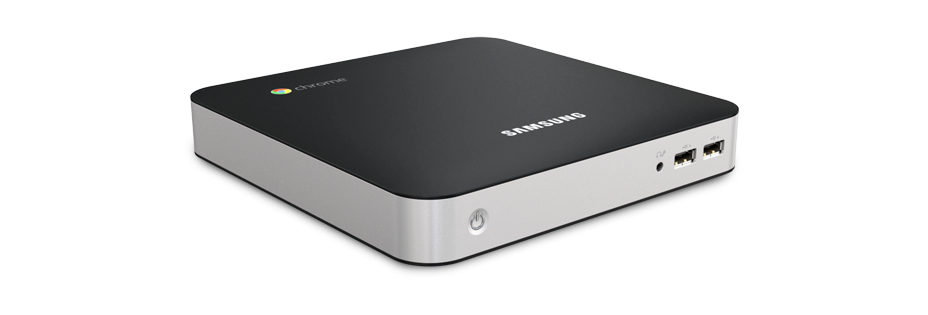 |
| Chromebox |
Hopefully, the architecture of the Android or Chrome OS has reached a stage of maturity that it will not become any larger or require a better chip set to just to run. The claim of the manufactures is that the Chromebox is future proof. This is something that Windows has not been able to make that claim. I have seen everything from Windows 3.0x onwards and will probably see Windows 9, 10 and .... The Chrome box appears to address the increasingly less frequent need for keyboard and hardwired networking at cheap unit price (£270) with provision for HDMI which seems to be becoming the standard. Traditional one connection type monitors appear to be a passing trend. HDMI TVs are becoming very cheap and are built to last and are pretty robust. Printers are not necessarily a future requirement in the digital classrooms.
So stripping out the hardware requirement of providing for access to IT resources leads to consideration of the network environment. Windows networks require administrators, technicians and specialised software to produce a safe working environment. The solution offered by Google is through the Chrome set up http://support.google.com/chromeos/a/bin/answer.py?hl=en&answer=1289314. This looks like a great solution especially for small schools which do not have access to technical expertise all the time.
A very Googlecentric blog post but I personal think the Android/Chrome platform has a lot to offer. The impact of technology should be there as a tool to be used appropriately and not because we have invested so much money in a lot of shiny boxes and need to use them!

