Showing posts with label VLE. Show all posts

Tuesday, 25 December 2012

12 Online Learning Experiences

21st Century Education

Christmas morning up and awake a bit of time before the house erupts with bouncy spaniels and excited children (some in their first childhood others in their second).  A good time to start to list some of the educational tools and VLEs I have used or become aware of over the years.  These are the most prominent, the ones that immediately spring to mind and are in no particular order.  If I miss one that is your favourite please add a comment or Google+ article or +Philip Spalding.   This links in with the ukonlinelearningcommunities project (medium term plan).  So twelve applications for Christmas!  I make no apologies for including so many Google offerings!


1. Google Plus Hangouts

Really like this application for allowing online real time collaboration.  A normal Google Plus account allows 10 users to interact.  A Google Apps for Education or a Google Apps for Business Account allows up to 15 people to interact.  That interaction can be then be streamed to a greater audience using your YouTube Channel where they can watch and listen but not join in!  Also allows the recording of the experience for future reference! 

2. SlideSpeech

A great way of converting your presentation to a learning experience that narrates the presentation.  An example I have constructed can be found at (http://slidespeech.com/s/kaTJthHeen/#slide0-slide).  More information on applications of SlideSpeech can be found by contacting +John Graves.  


3. StudyRoom

This is the study room facility used by Coursera and edX.  Our own Online Learning Community (Haverhill Online Learning Community) has secured a study room which we will be using extensively in the year as we grow our learning community.  Thanks to +Amadeus Malca for making this happen.

4. Blackboard

This is the traditional "biggy" in Virtual Learning Environments.  I have recently become an online tutor for Apricot Learning Online  who use this platform and after the training I have to say impressed with the scope of Blackboard.  Real advantages are the ability to structure personalised learning through Session Planner, speed of use and it's flexibilty.  The underlying technology is also very suitable for Safe Guarding vulnerable individuals!      

5. Moodle

This could be billed as the alternative Blackboard.  It is an opensource platform used by a few in the UK such as Oxford University for some of it's online CPD courses but has a greater following in the US.  Is best set up as a server based application, requiring downloads such as MySQL and PHP.  Personally have tried to load this to a single machine but had difficulties setting up the database first time.  Runs best on Linnux based systems, and as OpenSource is free.  Can see a lot of mileage in this one but will need to set up database properly if I am to use it in some of my commercial based activities (ie the not profit exceptions) through KritiRecharge2012.co.uk , the site is currently under construction and revision.


6. Hot Potatoes

A real old favourite of mine.  I have been using using this as long as it has been available, which must be at least 7 years.  Great for making small exercises quickly and saving as a HTML file that can either be added to a website or loaded from a machine locally.  First real application that allowed quick solutions to making child friendly exercises to support individual pupils in the classroom.  


7. Google Plus communities

What can I say? This is a staggering simple concept of the village green or local pub or coffee shop.  Really like the fact that technology behind the social interaction retreats into the background!  I have waxed a little lyrically  in the Blog post http://ukonlinelearningcommunities.blogspot.co.uk/2012/12/google-plus-comunities.html .

8. Scratch

The new methodology that is going to save British Computer Programming in schools?  Remains to be seen  but great programming interface.  Even features as the introduction to edX's CS50x Introduction to Computer Science 1, which I am currently working my way through.

I have also run successfully an online summer school based on Scratch.  However, that was before I discovered all the cool tools of Google Plus (but then a lot of them were not available then).

9. Google Course Builder

The potential to be the Rolls Royce solution in a moderately tech literate teacher's hands.  Have dabbled a bit in the mechanics while particpating in +Jeannie Crowley OFLC at the Bank Street College of Education in  New York's, which has now become the Online Learning Collective.  Have great ambitions to be using Google Course Builder regularly throughout 2013.

10.  Blogger

Probably my most used and useful social media platform to track my transition from traditional teaching to entering the realms of 21st Century Learning practitioner.  Have been blogging now for 2 years.  Very surprising how things have changed even in that short space of time!

11. Google Docs

The key technology for collaborative learning and sharing.  So much of a cornerstone easy to forget how important it is the development of the Google experience when other innovations such as Google Plus have come appeared. 

12. Google Apps for Business/Education

The nemesis of the web developer who has thrived on £100+ per page fees for designing static websites? Maybe! Hopefully!  The same applies for Education (Google Apps for Education).  Great tools for reducing the hammer from a platinum plated tool an insignificant pound shop (99 cent shop) variety.  This is where the threshold to true digital working and learning starts as the entrance costs have become minimal.  Looking forward to a more educated world in the next two decades!  One where everybody has access to free basic education!

Most of the above tools are free.  The time to master them is also becoming less and a lot of the operations of the tools within the applications are similar across learning platforms.

So here's to the next two decades of freely available education! Merry Christmas! 

Friday, 9 November 2012

Friday Reflection

Online and overland communication!

In a week when Sandy premièred in New York followed by snow,  the power of the internet for meetings and connections was for me reinforced.  The Wednesday hook up or Hangout happened  attended by other members of the Bank Street OLC.  Microphone problems aside it was possible to carry out a meeting, even though I was resorting to chat messaging, that was a thoughtful and provided new perspectives for my own practice.  The fact we could speak in real time across three continental shelves leads to greater understanding of for example terminology and other descriptions of online learning activites.

This week I have been chipping away at my own black box understanding where coding and computer science is concerned.  I am part the way through an Alison Diploma course on Programming in C.  The basis to the reasoning for attempting this I have blogged about in my last post.  I have had a look at the Wiki pages for Google Course Builder and will start looking at putting the materials together for Project Scratch.  This is a  CPD project for teachers to start to learn how to code using Scratch.

Thursday, yesterday, I embarked on an overland journey to talk to a small, expanding company run by very pleasant people. They have selected a particular niche in the online education sector.     Delivering learning to groups of pupils via virtual learning environments.  The model they are following is try to get the pupil to be immersed in the activity and have ownership. 

They are based in South Gloucestershire   After becoming lost trying to follow Google maps and drive at the same time I can understand why. The nature of 21st Century working is Teleworking (a representative organisation in the UK is the  Telework Association).  Their's is a prime example of this activity. 

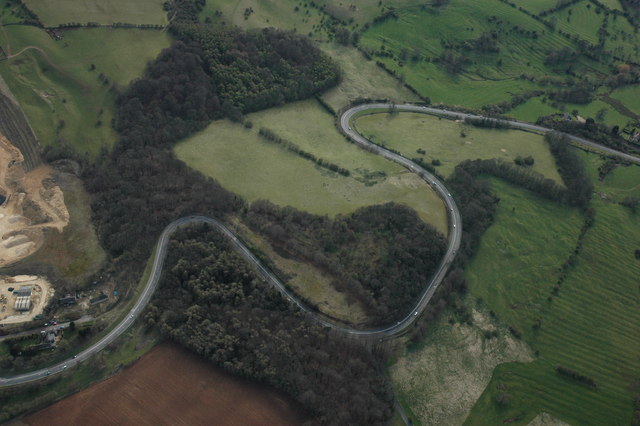
Fish Hill a 1 in 10 hill with great views
A Cotswold town
So after driving down Fish Hill (and back up again) I arrived in the Cotswold town.  As you can see a chocolate box High Street.  It is close to Sudeley Castle.  Having spent nearly five hours getting there I have to say the purchase of a discounted Road Map most valuable item bought this month (silly me thought I could just rely on Google Maps' directions forgetting the vagaries of UK highways Authorities signage and desire to redesign road layouts).  Prior to this purchase I had been following my nose and luckily it was working properly and I was only 15 miles from where I needed to be.  The map will be accompanying me Google Maps just there to calculate journey mileage and potential time!!  A lot of miles (500 or so) to eventually get back to Suffolk at about 4.30 pm, (left at 5.30 am that morning) but worth the trip to see how others are approaching the task of online learning.

Returning back to the reflection.  Last week I set myself the task of looking further at the Virginia Tech Model of learning activities .  I have developed my thinking a little further to include representation of the model as scattergram.  Included has been the step to incorporated a the model of Revised Bloom's Taxonomy and Vygotsky's Zone of Proximal Development.  This has been shared with members of the Bank  Street College OLC.  I will update the blog later to show the new model additions.

So for next week.  To pursue further leads for collaboration within the OLC group to move forward Project Scratch.  Blogcast the ideas of extending the Virginia Tech Model.  Continue to look at coding since we have an OLC deadline/waymark coming up and want to be able to have at least an outline project working.  Like the idea behind the NYC Learning Hive.  Have viewed the new initiatives launched in the UK by Mozilla.  A Hive or OLC is really appealing to set up with local volunteer centre (for whom I work with from time to time) and the local council.

Weekend starts here, POETS day being enforced (Push Off Early Tomorrow's Saturday!).
 

Thursday, 25 October 2012

The Right Slate!

The Roman Wax Tablet
(from Vindolanda)

Technology in the classroom!


On the face of it the use of a tablet is today a "new" concept.  The advent of cheap paper has led to the prevalence of a one time use recording medium.  The Roman Wax Tablet and the Victorian slate with hard or soft (chalk) stylus. The Victorian slate is still within living memory, especially with some of the 80 year olds who frequent my local pub!

So on the face of it paper in the classroom for recording thoughts has a relatively short history of general use.  The re-emergence of the age of the tablet age in the early 21st Century is  another milestone in mass education.  


The Victorian Slate
Looking at the Victorian slate the shape would be instantly recognisable to any child over the age of 4 (probably younger).  It's purpose apparent as long as the stylus was present. Cheap and abundant materials, often recyclable as  "everybody" had a slate roof in the Victorian Britain, that can be made into a essential classroom tool.

Here is the sticking point.  Cheap materials and universal access to the tool.  Manufacturers of learning tools, in this context tablets, have quite rightly used patent law to recoup their investment. The ongoing litigation between two major companies as to who invented the "wheel" is  possibly going to delay some of the take up of both products.  The entry cost and the propensity for updates or new operating systems is another headache.    


Google's latest offering, the Nexus 7 is a tablet I really like.  Experience of designing and procuring a whole school IT system, makes me wish there had been a solution such as this ten years ago.  The  cost per unit of £159 is reasonable could be a lot cheaper.  Android based tablets running Ice Cream Sandwich and Jelly Bean are available and perform the function but may not have the big brand coolness of a Google or for that matter Apple (there mentioned it) product.   

I have to admit I have only used a Nexus 7 so far in a PC World store.  I had until 4 months ago a Scroll tablet running Android 2.0x, and a USB keyboard/case.  This was all well and good until I signed up for the Telegraph Newspaper for Android.  Having not read the small print that the Telegraph content required Ice Cream Sandwich (Android 4.0) my experience was a bit curtailed.  The reason: the Scroll tablet was not powerful enough to be updated to Android 4.0.  The tablet had been bought about a year or 15 months ago, so really early in the evolution and visibility of Android tablets, and already was not able to run the latest Android.  The ARM race (pun intended) was  only just starting.  

Use of Google type hangout technology and other Google Apps for Education even removes the need for expensive projectors and Whiteboard Technologies.  The ownership of a single tablet through a pupil's learning journey is a bit like the Scientific Calculators we used to buy when we were 12 (pre-PC in the classroom).  I was using mine right through 1st year University Physics and beyond.  Increasingly pupils are being encouraged to carry internet enabled in schools as an aid to learning.  The distraction factor of these technologies and the monitoring of on task behaviour may become a problem initially especially with the  "Facebook Addiction" problems a lot of educators are concerned about.  Bluetooth may be one technology that could make a comeback within rooms.  It may also address some of the "open network" issues that fall in the remit of Safeguarding.   

Longevity of technology is a  key factor as much the physical layout of the learning environment.  Many traditional classrooms do not readily lend themselves to being digitised.  The schools building programme in the UK is a contentious issue with standardised  layouts being proposed that appear to rectangular boxes a bit like a shipping container.  These is even a designated cost per square foot that cannot be exceeded unles schools pay for it themselves (http://www.bbc.co.uk/news/education-19787570).   


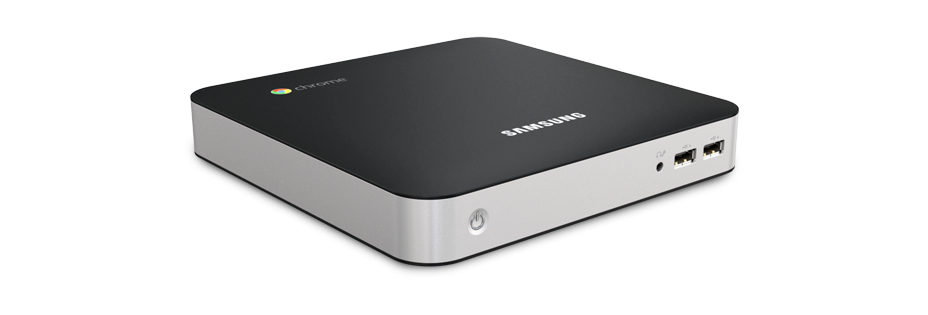
Chromebox
 Hopefully, the architecture of the Android or Chrome OS has reached a stage of maturity that it will not become any larger or require a better chip set to just to run.  The claim of the manufactures is that the Chromebox is future proof.  This is something that Windows has not been able to make that claim.  I have seen everything from Windows 3.0x onwards and will probably see Windows 9, 10 and ....     The Chrome box appears to address the increasingly less frequent need for keyboard and hardwired networking at cheap unit price (£270) with provision for HDMI which seems to be becoming the standard.  Traditional one connection type monitors appear to be a passing trend.  HDMI TVs are becoming very cheap and are built to last and are pretty robust.  Printers are not necessarily a future requirement in the digital classrooms.  

So stripping out the hardware requirement of providing for access to IT resources leads to consideration of the network environment.  Windows networks require administrators, technicians and specialised software to produce a safe working environment.  The solution offered by Google is through the Chrome set up http://support.google.com/chromeos/a/bin/answer.py?hl=en&answer=1289314.  This looks like a great solution especially for small schools which do not have access to technical expertise all the time.

A very Googlecentric  blog post but I personal think the Android/Chrome platform has a lot to offer.  The impact of technology should be there as a tool to be used appropriately and not because we have invested so much money in a lot of shiny boxes and need to use them!


Friday, 19 October 2012

Away from the Chalk Face!

The Friday Ladder:  Grimes Graves, Brecklands
http://en.wikipedia.org/wiki/Grimes_Graves  

Friday at the finishing post!

A Friday morning, still dark at 5.45 am (UK time),  time to see where we have been since Monday morning.

The picture of 5000 year old industry to the right is a very apt hook for this blog.  On Monday I started the odyssey away from the Chalkface.  

The semester for edX's CS50x (see link above in bar) commenced on Monday .  Semester strange term to the English eye, where terms are more usual linked around the major holiday periods.  Eleven weeks for the lecture cycle.  This is an example of MOOCs ( see previous Blog), an interesting experience of viewing lectures remotely.  A little bit of Scratch was introduced (something that I have used in a Summer School that I ran), an assignment to be completed.

Wednesday saw the start of an interaction with Bank Street College of Education, New York.  In this interaction/course, with online resources and courses interaction seems a better description of the experience,  we are as a group seeking to push forward our collective and individual understanding of VLEs (Virtual Learning Environments) for want of a generic term.  There at the moment does not appear to be a classification yet of the different types of learning experience available on line.  To this end I have created a GoogleDocs Spreadsheet for viewing trying to classify the types of learning experience and some of the terms used.  As with all new areas different people have used what to them is the most appropriate term.  As an educator I am more interested in the learning outcome based upon these tools rather than the elegance of the tool.  If it takes 10 hours to produce a whizzy presentation that lasts five minutes that is 9 hours and 55 minutes too long in an ideal world!

So having had the traditional platform of undergrad teaching transferred to the digital world with edX this week, what is happening next week?  Further exploration of the topics on the edX course will happen, I have to say that I am impressed by the level of support materials provided.  How this translates into something that can be used in the Virtual Classroom ( there another term ) would be an area to explore within the  OFTL interaction with Bank Street College.

A clear link for classroom teachers between learning  objective and learning outcome needs to be made with appropriate selection of the best IT resource.  Interactive Whiteboards are fine but not if the wall on which it is mounted moves due to poor workmanship (have experienced), or the room is the wrong shape for projection with pillars at inappropriate places.  (Architects please note this when designing new buildings).  

The cost implication is also a consideration in the especially in the UK at the moment.  The investment in computers we made many years ago has produced the model where we are often tied to particular delivery equipment and mechanisms. This is often due to the fact we have bought a system rather than analyse first what we want to with it!  (Headteachers are often guilty of being impressed with the look at the package what it can do in the hands of the salesman and say wow must have this, then it sits under a cloth in the corner of the room to be wheeled out when Inspectors arrive!)  And more importantly we may have neglected to audit the training requirement of staff who are going to use the equipment.  This is actually more difficult to do than it would at first seem owing to the human factor.  A period of sending round survey forms asking which IT resources staff used and what they would like often drew a blank, but many good intentions to fill out the survey to shape the experience.  This is because  most teachers in my experience are still not  100% confident the technology will work when they want it to work!  It is an after thought!    

To see the spreadsheet, initially, if you email me through the Google+ network or leave a comment I will email the link.  The spreadsheet is work in progress.  

So weekend maybe have a look at some Sicilian food http://2pointfiveageofman.blogspot.co.uk/2012/10/sunday-foodie-bit-sicilian-cookery.html!  There is life beyond the Chalkface!